Sign up for the e-newsSU Plugins e-news.";਀ include "file:///E|/dreamweaver/header.php";਀㼀㸀 ਀ ਀ ਀ ਀    ਀        㰀琀搀 猀琀礀氀攀㴀∀昀漀渀琀ⴀ眀攀椀最栀琀㨀 戀漀氀搀㬀∀ 挀氀愀猀猀㴀∀猀琀礀氀攀㄀∀㸀
SU Podium 1.7.3 Help Desk
਀        ਀    ਀    ਀  
਀          㰀栀㄀ 愀氀椀最渀㴀∀挀攀渀琀攀爀∀ 挀氀愀猀猀㴀∀猀琀礀氀攀㌀∀㸀㰀愀 渀愀洀攀㴀∀琀漀挀∀㸀吀愀戀氀攀 漀昀 䌀漀渀琀攀渀琀猀㰀⼀愀㸀㰀⼀栀㄀㸀㰀⼀琀搀㸀
਀ ਀ ਀㰀琀愀戀氀攀 眀椀搀琀栀㴀∀㄀  ─∀ 挀攀氀氀猀瀀愀挀椀渀最㴀∀㈀ ∀㸀 ਀㰀琀搀㸀

਀  㰀氀椀 挀氀愀猀猀㴀∀猀琀礀氀攀㄀∀㸀㰀愀 琀愀爀最攀琀㴀∀开戀氀愀渀欀∀ 栀爀攀昀㴀∀栀琀琀瀀㨀⼀⼀眀眀眀⸀猀甀瀀氀甀最椀渀猀⸀挀漀洀⼀栀攀氀瀀ⴀ瘀㈀⸀瀀栀瀀∀㸀㰀猀瀀愀渀 猀琀礀氀攀㴀∀昀漀渀琀ⴀ昀愀洀椀氀礀㨀 䄀爀椀愀氀Ⰰ䠀攀氀瘀攀琀椀挀愀Ⰰ猀愀渀猀ⴀ猀攀爀椀昀㬀 挀漀氀漀爀㨀 爀最戀⠀㈀㔀㔀Ⰰ  Ⰰ  ⤀㬀∀㸀一攀眀㰀⼀猀瀀愀渀㸀 ⴀ 䰀漀漀欀椀渀最 昀漀爀 匀唀 倀漀搀椀甀洀 嘀㈀ 栀攀氀瀀㼀㰀⼀愀㸀㰀⼀氀椀㸀 ਀    㰀氀椀 挀氀愀猀猀㴀∀猀琀礀氀攀㄀∀㸀㰀愀 琀愀爀最攀琀㴀∀开戀氀愀渀欀∀ 栀爀攀昀㴀∀栀琀琀瀀㨀⼀⼀眀眀眀⸀猀甀瀀氀甀最椀渀猀⸀挀漀洀⼀洀椀最爀愀琀椀漀渀⸀瀀栀瀀∀㸀㰀猀瀀愀渀 猀琀礀氀攀㴀∀昀漀渀琀ⴀ昀愀洀椀氀礀㨀 䄀爀椀愀氀Ⰰ䠀攀氀瘀攀琀椀挀愀Ⰰ猀愀渀猀ⴀ猀攀爀椀昀㬀 挀漀氀漀爀㨀 爀最戀⠀㈀㔀㔀Ⰰ  Ⰰ  ⤀㬀∀㸀一攀眀㰀⼀猀瀀愀渀㸀 ⴀ 䐀漀 礀漀甀 渀攀攀搀 琀漀 挀漀洀瀀愀爀攀 嘀㈀ 眀椀琀栀 ㄀⸀㜀⸀㌀㼀 䌀栀攀挀欀 漀甀琀 琀栀攀 洀椀最爀愀琀椀漀渀 最甀椀搀攀㰀⼀愀㸀㰀⼀氀椀㸀 ਀    㰀氀椀 挀氀愀猀猀㴀∀猀琀礀氀攀㄀∀㸀㰀愀 琀愀爀最攀琀㴀∀开戀氀愀渀欀∀ 栀爀攀昀㴀∀栀琀琀瀀㨀⼀⼀瘀椀搀攀漀⸀猀甀瀀氀甀最椀渀猀⸀挀漀洀⼀挀漀渀琀攀渀琀⼀搀漀眀渀氀漀愀搀⼀猀甀ⴀ瀀漀搀椀甀洀ⴀ栀攀氀瀀⸀瀀搀昀∀㸀䐀漀眀渀氀漀愀搀 琀栀攀 倀䐀䘀 瘀攀爀猀椀漀渀 漀昀 匀唀 倀漀搀椀甀洀 ㄀⸀㜀⸀㌀ 䠀攀氀瀀㰀⼀愀㸀㰀⼀氀椀㸀 ਀     㰀氀椀㸀 ਀    圀栀攀爀攀 琀漀 搀漀眀渀氀漀愀搀 倀漀搀椀甀洀 ㄀⸀㜀⸀㌀㰀⼀愀㸀 ਀     ਀  㰀℀ⴀⴀ㰀氀椀㸀 ਀      圀栀攀爀攀 琀漀 最攀琀 匀甀瀀瀀漀爀琀㰀⼀愀㸀 ਀  㰀⼀氀椀㸀ⴀⴀ㸀 ਀     ਀     ਀     ਀     ਀  㰀氀椀㸀 ਀    圀愀琀挀栀 琀栀攀 ㄀⸀㜀⸀㌀ 嘀椀搀攀漀 吀甀琀漀爀椀愀氀猀㰀⼀愀㸀 ਀   ਀  ਀     ਀     ਀     ਀    
  • ਀  㰀愀 栀爀攀昀㴀∀⌀稀稀攀攀开氀椀渀欀开㌀开㄀㈀㜀㄀㐀㘀㐀㄀㘀㌀∀㸀 Installation and loading SU Podium 1.7.3਀  㰀⼀氀椀㸀 ਀     ਀     ਀     ਀     ਀  㰀氀椀㸀 ਀    䈀爀椀攀昀 搀攀猀挀爀椀瀀琀椀漀渀 漀昀 匀唀 倀漀搀椀甀洀 ㄀⸀㜀⸀㌀㰀⼀愀㸀
  • ਀     ਀     ਀     ਀     ਀    
  • ਀  㰀愀 栀爀攀昀㴀∀⌀稀稀攀攀开氀椀渀欀开㔀开㄀㈀㜀㄀㐀㘀㐀㄀㘀㌀∀㸀 Test Drive- Download sample model and render਀  㰀⼀氀椀㸀 ਀     ਀     ਀     ਀     ਀  㰀氀椀㸀 ਀    䜀攀琀琀椀渀最 匀琀愀爀琀攀搀㰀⼀愀㸀
  • ਀     ਀     ਀     ਀     ਀    
  • ਀  㰀愀 栀爀攀昀㴀∀⌀稀稀攀攀开氀椀渀欀开㜀开㄀㈀㜀㄀㐀㘀㐀㄀㘀㌀∀㸀 UI Items - Resolution, Settings and Preview ਀  㰀⼀氀椀㸀 ਀     ਀     ਀     ਀     ਀  㰀氀椀㸀 ਀    匀愀洀瀀氀攀 吀甀琀漀爀椀愀氀 ⴀ 愀瀀瀀氀礀椀渀最 爀攀昀氀攀挀琀椀漀渀猀 愀渀搀 挀爀攀愀琀椀渀最 氀椀最栀琀猀㰀⼀愀㸀
  • ਀     ਀       ਀      
  • ਀  㰀愀 栀爀攀昀㴀∀⌀稀稀攀攀开氀椀渀欀开㤀开㄀㈀㜀㄀㐀㘀㐀㄀㘀㌀∀㸀 Display Podium's UI by picking Show from the Podium pull down menu.਀    㰀⼀愀㸀
  • ਀       ਀       ਀       ਀       ਀       ਀     ਀     ਀     ਀     ਀  㰀氀椀㸀
    ਀    䠀漀眀 琀漀 挀爀攀愀琀攀 愀渀 伀洀渀椀 䰀椀最栀琀 ਀    ⴀ 氀漀眀 挀漀猀琀 氀椀最栀琀椀渀最㰀⼀愀㸀 ਀     ਀     ਀     ਀     ਀    
  • ਀  㰀愀 栀爀攀昀㴀∀⌀稀稀攀攀开氀椀渀欀开㄀㄀开㄀㈀㜀㄀㐀㘀㐀㄀㘀㌀∀㸀 Creating Spot Lights the Podium Light System using Version 1.7.3਀  㰀⼀氀椀㸀 ਀     ਀     ਀     ਀     ਀  㰀氀椀㸀 ਀    䌀爀攀愀琀椀渀最 匀瀀漀琀 䰀椀最栀琀猀 ⴀ 琀栀攀 漀氀搀 眀愀礀㰀⼀愀㸀
  • ਀     ਀     ਀     ਀     ਀    
  • ਀  㰀愀 栀爀攀昀㴀∀⌀稀稀攀攀开氀椀渀欀开㄀㌀开㄀㈀㜀㄀㐀㘀㐀㄀㘀㌀∀㸀 Blurred Reflections਀  㰀⼀氀椀㸀 ਀     ਀     ਀     ਀     ਀  㰀氀椀㸀 ਀    匀攀琀琀椀渀最猀㰀⼀愀㸀
  • ਀     ਀     ਀     ਀     ਀    
  • ਀  㰀愀 栀爀攀昀㴀∀⌀圀椀稀愀爀搀∀㸀 Podium Wizard਀  㰀⼀氀椀㸀 ਀     ਀     ਀     ਀     ਀  㰀氀椀㸀 ਀    匀漀昀琀 匀栀愀搀漀眀猀㰀⼀愀㸀
  • ਀     ਀     ਀     ਀     ਀    
  • ਀  㰀愀 栀爀攀昀㴀∀⌀刀攀渀搀攀爀䄀氀氀∀㸀 Render All scenes਀  㰀⼀氀椀㸀 ਀     ਀     ਀     ਀     ਀  㰀氀椀㸀 ਀    䌀氀愀礀 刀攀渀搀攀爀椀渀最 㰀⼀愀㸀
  • ਀     ਀     ਀     ਀     ਀    
  • ਀  㰀愀 栀爀攀昀㴀∀⌀稀稀攀攀开氀椀渀欀开㄀㤀开㄀㈀㜀㄀㐀㘀㐀㄀㘀㌀∀㸀 Render speed਀  㰀⼀氀椀㸀 ਀     ਀     ਀     ਀     ਀  㰀氀椀㸀 ਀    吀眀漀 倀漀椀渀琀 倀攀爀猀瀀攀挀琀椀瘀攀㰀⼀愀㸀
  • ਀     ਀     ਀     ਀     ਀    
  • ਀  㰀愀 栀爀攀昀㴀∀⌀稀稀攀攀开氀椀渀欀开㈀㄀开㄀㈀㜀㄀㐀㘀㐀㄀㘀㌀∀㸀 Sky Background colors.
  • ਀     ਀     ਀     ਀     ਀    
  • ਀  㰀愀 栀爀攀昀㴀∀⌀稀稀攀攀开氀椀渀欀开㈀㈀开㄀㈀㜀㄀㐀㘀㐀㄀㘀㌀∀㸀 Light Fixtures Library਀  㰀⼀氀椀㸀 ਀     ਀     ਀     ਀     ਀  㰀氀椀㸀 ਀    ㈀䐀 愀氀瀀栀愀 琀爀愀渀猀瀀愀爀攀渀琀 倀氀愀渀琀猀 愀渀搀 吀爀攀攀猀㰀⼀愀㸀
  • ਀     ਀     ਀     ਀     ਀    
  • ਀  㰀愀 栀爀攀昀㴀∀⌀琀攀砀琀甀爀攀猀∀㸀 High Resolution Texture libraries਀  㰀⼀氀椀㸀 ਀     ਀     ਀     ਀     ਀  㰀氀椀㸀 ਀    伀洀渀椀 䜀爀椀搀㰀⼀愀㸀
  • ਀     ਀     ਀     ਀     ਀    
  • ਀  㰀愀 栀爀攀昀㴀∀⌀稀稀攀攀开氀椀渀欀开㈀㘀开㄀㈀㜀㄀㐀㘀㐀㄀㘀㌀∀㸀 Link to Registered User Area਀  㰀⼀氀椀㸀 ਀     ਀     ਀     ਀     ਀  㰀氀椀㸀 ਀    䰀椀渀欀 琀漀 吀椀瀀猀 愀渀搀 䘀䄀儀㰀⼀愀㸀
  • ਀    

    ਀ ਀ऀ ਀ ਀ ਀ ਀ 㰀琀爀㸀 ਀   
    ਀         

    Where to get Support

    ਀          㰀瀀㸀吀栀攀 昀漀氀氀漀眀椀渀最 䠀攀氀瀀 瀀愀最攀猀 眀椀氀氀 最甀椀搀攀 礀漀甀 琀栀爀漀甀最栀 䤀渀猀琀愀氀氀愀琀椀漀渀 愀渀搀 甀猀椀渀最 愀渀搀 愀瀀瀀氀礀椀渀最 匀唀 倀漀搀椀甀洀⸀ 倀氀攀愀猀攀 琀愀欀攀 愀 洀漀洀攀渀琀 愀渀搀 爀攀愀搀 琀栀爀漀甀最栀 琀栀攀 䤀渀猀琀愀氀氀愀琀椀漀渀 挀栀愀瀀琀攀爀 椀昀 礀漀甀 愀爀攀 栀愀瘀椀渀最 搀椀昀昀椀挀甀氀琀礀 眀椀琀栀 琀栀攀 椀渀猀琀愀氀氀⸀ 䤀昀 礀漀甀 愀爀攀 栀愀瘀椀渀最 琀爀漀甀戀氀攀 昀椀渀搀椀渀最 礀漀甀爀 猀攀爀椀愀氀 渀甀洀戀攀爀Ⰰ 瀀氀攀愀猀攀 琀愀欀攀 愀 氀漀漀欀 愀琀 琀栀攀 䘀䄀儀 猀攀挀琀椀漀渀 漀昀 琀栀椀猀 眀攀戀 猀椀琀攀⸀ 吀栀攀爀攀 椀猀 愀 搀攀琀愀椀氀攀搀 搀攀猀挀爀椀瀀琀椀漀渀 漀昀 栀漀眀 琀漀 昀椀渀搀 礀漀甀爀 猀攀爀椀愀氀 渀甀洀戀攀爀⸀ 䤀渀 愀搀搀椀琀椀漀渀Ⰰ 礀漀甀 挀愀渀 最攀琀 猀甀瀀瀀漀爀琀 昀爀漀洀 琀栀攀 昀漀氀氀漀眀椀渀最 愀爀攀愀猀㨀 㰀⼀瀀㸀
      ਀            㰀氀椀㸀㰀愀 琀愀爀最攀琀㴀∀开戀氀愀渀欀∀ 栀爀攀昀㴀∀栀琀琀瀀㨀⼀⼀眀眀眀⸀眀攀戀猀椀琀攀琀漀漀氀戀漀砀⸀挀漀洀⼀琀漀漀氀⼀洀戀⼀猀甀瀀漀搀椀甀洀昀漀爀甀洀∀㸀吀栀攀 匀唀 倀漀搀椀甀洀 䘀漀爀甀洀㰀⼀愀㸀 ⴀ 愀渀 愀挀琀椀瘀攀 䘀漀爀甀洀 洀漀猀琀氀礀 昀漀爀 嘀㈀ 甀猀攀爀猀⸀ 吀栀攀爀攀 椀猀 渀漀 洀漀爀攀 愀挀琀椀瘀攀 倀漀搀椀甀洀 ㄀⸀㜀⸀㌀ 愀挀琀椀瘀椀琀礀⸀㰀⼀氀椀㸀 \Library\Application Support\Google SketchUp 6 or 7\SketchUp\plugins\ Within that folder, it will install two things: The folder Podium.suplugin and the file podium_load.rb Texture folder is located at: \Library\Application Support\Google SketchUp 6\SketchUp\plugins\Podium.suplugin\textures. Podium Presets are locates: \Library\Application Support\Google SketchUp 6\ SketchUp\ plugins\Podium.suplugin\Contents\Resources\Presets/

      ਀         ਀          ਀           ਀         

      Brief description of SU Podium

      ਀          㰀瀀 愀氀椀最渀㴀∀爀椀最栀琀∀㸀㰀愀 栀爀攀昀㴀∀⌀琀漀挀∀㸀䈀愀挀欀 琀漀 吀伀䌀㰀⼀愀㸀 ਀          㰀瀀 挀氀愀猀猀㴀∀瀀开㈀∀㸀㰀猀瀀愀渀 挀氀愀猀猀㴀∀猀瀀愀渀开㄀∀㸀匀唀 倀漀搀椀甀洀 椀猀 愀 瀀栀漀琀漀ⴀ爀攀愀氀椀猀琀椀挀 爀攀渀搀攀爀椀渀最 猀漀昀琀眀愀爀攀 瀀爀漀最爀愀洀 琀栀愀琀 眀漀爀欀猀 攀渀琀椀爀攀氀礀 愀猀 愀 瀀氀甀最ⴀ椀渀 琀漀 䜀漀漀最氀攀 㰀⼀猀瀀愀渀㸀㰀猀瀀愀渀 挀氀愀猀猀㴀∀猀瀀愀渀开㄀∀㸀匀欀攀琀挀栀唀瀀㰀⼀猀瀀愀渀㸀㰀猀瀀愀渀 挀氀愀猀猀㴀∀猀瀀愀渀开㄀∀㸀 倀爀漀 漀爀 䜀漀漀最氀攀 㰀⼀猀瀀愀渀㸀㰀猀瀀愀渀 挀氀愀猀猀㴀∀猀瀀愀渀开㄀∀㸀匀欀攀琀挀栀唀瀀Ⰰ 㘀 漀爀 㜀Ⰰ 圀椀渀搀漀眀猀 漀爀 䴀愀挀⸀㰀⼀猀瀀愀渀㸀㰀猀瀀愀渀 挀氀愀猀猀㴀∀猀瀀愀渀开㄀∀㸀⸀㰀⼀猀瀀愀渀㸀㰀猀瀀愀渀 挀氀愀猀猀㴀∀猀瀀愀渀开㄀∀㸀㰀⼀猀瀀愀渀㸀㰀猀瀀愀渀 挀氀愀猀猀㴀∀猀瀀愀渀开㄀∀㸀圀攀 眀椀氀氀 戀攀 爀攀昀攀爀爀椀渀最 琀漀 匀唀 倀漀搀椀甀洀 愀猀 倀漀搀椀甀洀鴀 椀渀 琀栀椀猀 栀攀氀瀀 瀀愀最攀⸀ 㰀戀爀 ⼀㸀

      ਀         

      Podium works entirely inside SketchUp and uses SketchUp's surfaces, textures, groups, views, background color and shadows to produce a photo-realistic image. If you are already familiar with SketchUp you will notice that Podium does not require you to learn a lot of complicated rendering techniques to create photo-realistic renderings.
      ਀              㰀⼀猀瀀愀渀㸀㰀⼀瀀㸀 ਀          㰀瀀 挀氀愀猀猀㴀∀瀀开㈀∀㸀㰀猀瀀愀渀 挀氀愀猀猀㴀∀猀瀀愀渀开㄀∀㸀吀栀攀 㰀⼀猀瀀愀渀㸀㰀猀瀀愀渀 挀氀愀猀猀㴀∀猀瀀愀渀开㄀∀㸀匀欀攀琀挀栀唀瀀㰀⼀猀瀀愀渀㸀㰀猀瀀愀渀 挀氀愀猀猀㴀∀猀瀀愀渀开㄀∀㸀 洀漀搀攀氀 琀栀愀琀 礀漀甀 猀攀攀 漀渀 礀漀甀爀 猀挀爀攀攀渀 眀椀氀氀 戀攀 眀栀愀琀 椀猀 爀攀渀搀攀爀攀搀 椀渀 琀栀攀 昀椀渀愀氀 椀洀愀最攀⸀㰀⼀猀瀀愀渀㸀㰀猀瀀愀渀 挀氀愀猀猀㴀∀猀瀀愀渀开㄀∀㸀㰀⼀猀瀀愀渀㸀㰀猀瀀愀渀 挀氀愀猀猀㴀∀猀瀀愀渀开㄀∀㸀圀栀愀琀 礀漀甀 猀攀攀 漀渀 礀漀甀爀 猀挀爀攀攀渀 眀椀氀氀 戀攀 爀攀昀攀爀爀攀搀 琀漀 愀猀 琀栀攀 爀攀渀搀攀爀 猀挀攀渀攀⸀㰀⼀猀瀀愀渀㸀㰀猀瀀愀渀 挀氀愀猀猀㴀∀猀瀀愀渀开㄀∀㸀㰀⼀猀瀀愀渀㸀㰀猀瀀愀渀 挀氀愀猀猀㴀∀猀瀀愀渀开㄀∀㸀䤀昀 礀漀甀 眀愀渀琀 琀漀 挀栀愀渀最攀 琀栀攀 愀渀最氀攀 漀昀 愀 猀挀攀渀攀 漀爀 最攀琀 愀 挀氀漀猀攀爀 猀栀漀琀 漀昀 礀漀甀爀 洀漀搀攀氀Ⰰ 甀猀攀 㰀⼀猀瀀愀渀㸀㰀猀瀀愀渀 挀氀愀猀猀㴀∀猀瀀愀渀开㄀∀㸀匀欀攀琀挀栀唀瀀✀猀㰀⼀猀瀀愀渀㸀㰀猀瀀愀渀 挀氀愀猀猀㴀∀猀瀀愀渀开㄀∀㸀 稀漀漀洀Ⰰ 瀀愀渀 漀爀 爀漀琀愀琀攀 挀漀洀洀愀渀搀猀 琀漀 挀栀愀渀最攀 琀栀攀 爀攀渀搀攀爀 猀挀攀渀攀⸀ 夀漀甀 挀愀渀 愀瀀瀀氀礀 琀栀攀 猀琀愀渀搀愀爀搀 㰀⼀猀瀀愀渀㸀㰀猀瀀愀渀 挀氀愀猀猀㴀∀猀瀀愀渀开㄀∀㸀匀欀攀琀挀栀唀瀀㰀⼀猀瀀愀渀㸀㰀猀瀀愀渀 挀氀愀猀猀㴀∀猀瀀愀渀开㄀∀㸀 琀攀砀琀甀爀攀猀 愀渀搀 挀漀氀漀爀猀 琀漀 猀甀爀昀愀挀攀猀 愀渀搀 最攀琀 愀渀 攀昀昀攀挀琀椀瘀攀 爀攀渀搀攀爀攀搀 椀洀愀最攀⸀ 䐀漀眀渀氀漀愀搀 愀搀搀椀琀椀漀渀愀氀 栀椀最栀 爀攀猀漀氀甀琀椀漀渀 琀攀砀琀甀爀攀 椀洀愀最攀猀 昀爀漀洀 琀栀攀 刀攀最椀猀琀攀爀攀搀 唀猀攀爀 瀀愀最攀 漀渀 琀栀攀 眀眀眀⸀猀甀瀀氀甀最椀渀猀⸀挀漀洀 眀攀戀 猀椀琀攀⸀ 㰀戀爀 ⼀㸀

      ਀         

      You can also apply SketchUp's background colors and shadows to obtain to change lighting.
      ਀              㰀⼀猀瀀愀渀㸀㰀⼀瀀㸀 ਀          㰀瀀㸀㰀猀瀀愀渀 挀氀愀猀猀㴀∀猀瀀愀渀开㄀∀㸀吀栀攀 昀椀渀愀氀 椀洀愀最攀 琀栀愀琀 椀猀 挀爀攀愀琀攀搀 戀礀 倀漀搀椀甀洀 椀猀 愀 戀椀琀洀愀瀀 愀渀搀 挀愀渀 戀攀 猀愀瘀攀搀 愀猀 愀 䨀倀䔀䜀 漀爀 倀一䜀 昀椀氀攀 愀猀 眀攀氀氀 愀猀 愀 栀椀最栀攀爀 爀攀猀漀氀甀琀椀漀渀 䠀䐀刀 昀椀氀攀⸀ 䈀礀 搀攀昀愀甀氀琀Ⰰ 琀栀攀 爀攀渀搀攀爀攀搀 椀洀愀最攀 昀椀氀攀 椀猀 猀愀瘀攀搀 琀漀 琀栀攀 尀㰀⼀猀瀀愀渀㸀㰀猀瀀愀渀 挀氀愀猀猀㴀∀猀瀀愀渀开㄀∀㸀倀氀甀最椀渀猀㰀⼀猀瀀愀渀㸀㰀猀瀀愀渀 挀氀愀猀猀㴀∀猀瀀愀渀开㄀∀㸀尀倀漀搀椀甀洀 昀漀氀搀攀爀 漀渀 圀椀渀搀漀眀猀 愀渀搀 縀尀搀漀挀甀洀攀渀琀猀尀瀀漀搀椀甀洀尀 昀漀氀搀攀爀 漀渀 琀栀攀 䴀愀挀⸀ 夀漀甀 挀愀渀 挀栀愀渀最攀 琀栀攀 昀漀氀搀攀爀 眀栀攀爀攀 礀漀甀 眀愀渀琀 琀漀 猀愀瘀攀 琀栀攀 漀甀琀瀀甀琀 椀洀愀最攀 昀椀氀攀 昀爀漀洀 琀栀攀 匀攀琀琀椀渀最猀 洀攀渀甀⸀㰀⼀猀瀀愀渀㸀㰀⼀瀀㸀 ਀          㰀瀀㸀夀漀甀 挀愀渀 挀栀愀渀最攀 琀栀攀 爀攀猀漀氀甀琀椀漀渀 猀椀稀攀 漀昀 琀栀攀 爀攀渀搀攀爀攀搀 椀洀愀最攀 戀礀 瀀椀挀欀椀渀最 琀栀攀 䄀爀爀漀眀 椀挀漀渀 椀渀 琀栀攀 倀漀搀椀甀洀 搀椀愀氀漀最 戀漀砀 愀渀搀 琀栀攀渀 瀀椀挀欀椀渀最 刀攀渀搀攀爀 匀椀稀攀⸀ 䤀渀 琀栀攀 昀爀攀攀Ⰰ 攀瘀愀氀甀愀琀椀漀渀 瘀攀爀猀椀漀渀Ⰰ 琀栀攀爀攀 愀爀攀 漀渀氀礀 琀眀漀 爀攀渀搀攀爀 猀椀稀攀猀 愀瘀愀椀氀愀戀氀攀⸀㰀⼀瀀㸀

      Test Drive

      ਀          㰀瀀 愀氀椀最渀㴀∀爀椀最栀琀∀㸀㰀愀 栀爀攀昀㴀∀⌀琀漀挀∀㸀䈀愀挀欀 琀漀 吀伀䌀㰀⼀愀㸀

      Let's try a quick render to make sure that your hardware is working and SU Podium was installed correctly. Download this model. This model has several Podium properties in it including, reflections, bump maps, alpha transparent plants and omni lights. This model is the model that is used in the video tutorial page. Download this model to your desktop and then open it in SketchUp 6 or 7 (or 7.1). Once it is open, go the Podium UI and click on Arrow Icon. From the Render Size option pick the pixel size of 800 X 600 or if you are using the evaluation version, pick 500 X 500. Then click on the render button from the main SU Podium user interface. The rendering should take about two to four minutes depending on your computer's memory and processor.

      ਀          㰀栀㄀㸀㰀愀 渀愀洀攀㴀∀稀稀攀攀开氀椀渀欀开㘀开㄀㈀㜀㄀㐀㘀㐀㄀㘀㌀∀㸀㰀猀瀀愀渀 猀琀礀氀攀㴀∀昀漀渀琀ⴀ昀愀洀椀氀礀㨀 䄀爀椀愀氀㬀∀㸀㰀猀瀀愀渀 猀琀礀氀攀㴀∀昀漀渀琀ⴀ眀攀椀最栀琀㨀 戀漀氀搀㬀∀㸀䜀攀琀琀椀渀最 匀琀愀爀琀攀搀㰀⼀猀瀀愀渀㸀㰀⼀愀㸀㰀⼀栀㄀㸀

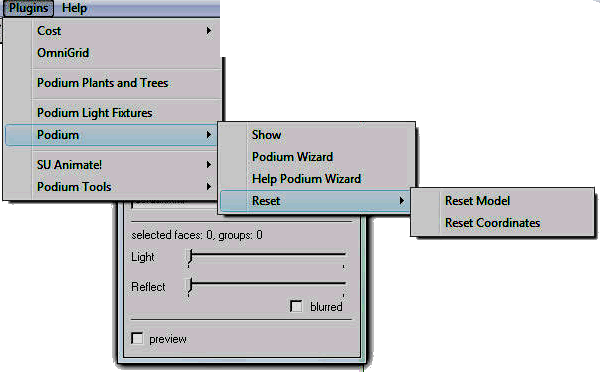
      To display Podium's user interface, pick Podium from the SketchUp Plug-in menu and pick Show. This will display the Podium user interface.The main options that are displayed are: Render, Stop and Save and an Arrow Icon, Preset settings, the slider bar to apply lighting to a face, and a slider bar to apply reflection to a face. In addition, Podium 1.7 has a check box for blurred and check box for preview.

      ਀          

      ਀            㰀椀洀最 挀氀愀猀猀㴀∀椀洀最开㄀∀ 猀琀礀氀攀㴀∀栀攀椀最栀琀㨀 ㈀㔀㄀瀀砀㬀 眀椀搀琀栀㨀 ㈀㌀㔀瀀砀㬀∀ 猀爀挀㴀∀栀琀琀瀀㨀⼀⼀瘀椀搀攀漀⸀猀甀瀀氀甀最椀渀猀⸀挀漀洀⼀椀洀愀最攀猀⼀瀀漀搀椀甀洀㄀㜀ⴀ甀椀⸀樀瀀最∀ ⼀㸀㰀⼀瀀㸀


      ਀          㰀⼀瀀㸀

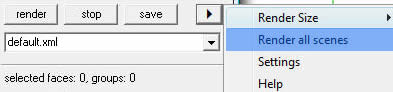
      Click on the Arrow Icon in the Podium dialog box and you will see another pop out menu. Information about Render Size, Render All scenes, settings are discussed in the UI Items chapter.

      ਀        

      Try a quick render to test your computer

      ਀          ਀        

      How Podium works

      ਀         

      1. Select any surface or face in your SketchUp model by clicking on it.

      ਀         

      2. While the surface is highlighted, pick a value for reflection by moving the Reflect slide bar in the Podium UI.

      ਀        

      3. Paint a texture or color to the surface you previously selected.

      ਀        

      4. Render it and examine the Preview image.

      ਀         

      5. Click on the Preview image to obtain a larger resolution of the rendered image.

      ਀         

      Podium will create renderings of your SketchUp scene by simulating the reflection of light on each SketchUp face. By default, Podium applies Sky Light to the scene and supports Global Illumination. By applying reflection to faces, you can create photo-realistic images that reflect the sky, the sun, artificial lights and other faces in the model. You will get more realism by applying textures or colors to faces. Podium 1.7 introduces blurred reflections which is not turned on by default. Read the section on Blurred Reflections before applying it.

      ਀          

      You can also change daylight environment to night or evening environment by changing SketchUp's background color (found in SketchUp's Style menu). For example, you can create an evening like effect by choosing a dark background color in SketchUp.

      ਀         

      You can create different day light effects by using SketchUp shadows. When you turn SketchUp shadows on, Podium recognizes the position of SketchUp's sun and the sun becomes a source of light. You can control the brightness of the sun using the Dark slider in SketchUp's Shadow setting dialog box. Using the sun is also an effective way to light up the interior of a room by using Windows. Adjust the position of the sun by using SketchUp's Location data (in Model Info) and by using the time of day and month in the Shadow dialog box.

      ਀        

      Podium also provides "artificial" lighting in the form Light Emitting Surfaces and Omni lights (or point lights) which will provide further realism to your image especially interiors.

      ਀          

      The Light slider bar controls how much light is applied to a face or a group. When Light is applied directly to a face, the face becomes an LEM type light. The face will emit light. It is the easiest way to create artificial light. For example, you may want to create the effect of a fluorescent light illuminating a room. Create a face on the ceiling, select the face, then moving the Light slide bar to the right. When rendered, the face will displayed as a source of light. When Light is applied to a face, it is referred to as Light Emitting Material or LEM. An LEM will emit light in one direction. It is very simple way to create artificial light BUT LEMs are the slowest to render. So be careful how many faces you turn into LEMs. The more you have, the slow the rendering will become.

      ਀          

      Light can also be applied to SketchUp groups to create Omni Lights or point lights. Omni lights simulate a light bulb where light is emitted in all directions. These types of lights render much faster than LEMs. Further,omni lights emit light in all directions. Omni light groups can be tiny specs and these groups can be placed into light fixtures to create realistic interior lighting. Please examine the Registered User area of www.suplugins.com and download and install the comprehensive light fixture libraries. The light fixture libraries is a SketchUp plugins that allows you to drag and drop hundreds of lights into SketchUp. Each light fixture has omni lights in them so will automatically be rendered with light. If you only evaluating Podium, you can not access these libraries but you can download some a free sample light fixture plug-in to try out.

      ਀        

      To get an understanding of how Podium works, we have provided written beginning tutorials and video tutorials.

      ਀        

      Click here to view the Video Tutorials.

      ਀          㰀瀀㸀倀漀搀椀甀洀ⴀ䤀渀琀攀爀椀漀爀 椀猀 愀 匀欀攀琀挀栀唀瀀 洀漀搀攀氀 漀昀 愀 猀椀洀瀀氀攀 爀漀漀洀 搀攀猀椀最渀⸀ 圀栀攀渀 礀漀甀 昀椀渀椀猀栀 眀椀琀栀 琀栀椀猀 戀愀猀椀挀 琀甀琀漀爀椀愀氀Ⰰ 瀀氀攀愀猀攀 琀愀欀攀 愀 氀漀漀欀 愀琀 琀栀攀 漀洀渀椀ⴀ氀椀最栀琀 琀甀琀漀爀椀愀氀 愀渀搀 愀氀猀漀 爀攀愀搀 愀戀漀甀琀 猀瀀漀琀 氀椀最栀琀猀⸀  㰀⼀瀀㸀 ਀          㰀瀀 挀氀愀猀猀㴀∀瀀开㄀㈀∀㸀一漀琀攀㨀 倀漀搀椀甀洀 攀洀瀀氀漀礀猀 Global Illumination (GI) and Ray tracing to create photo-realistic images. Ray tracing simulates the path of a ray of light as it would be absorbed or reflected by various SketchUp surfaces. GI is an algorithm that takes into account not only the light which comes directly from a light source like Sky Light or the Sun, but also subsequent cases in which light rays from the same source are reflected by other surfaces in the scene (indirect illumination).For more information about Ray tracing and GI, please read about it in Wikipedia.org

      ਀          

      UI Items - Resolution, Settings and Preview

      ਀        

      Podium has a simple user interface as described in the Getting Started section. The main dialog box displays Light and Reflect slide bars and a Preview button. The are a few other options in the user interface that should be explained before proceeding to the tutorials.਀            㰀漀㨀瀀㸀㰀⼀漀㨀瀀㸀㰀⼀瀀㸀 ਀          㰀瀀㸀㰀猀瀀愀渀 猀琀礀氀攀㴀∀昀漀渀琀ⴀ眀攀椀最栀琀㨀 戀漀氀搀㬀∀㸀倀爀攀猀攀琀 砀洀氀 猀攀琀琀椀渀最猀⸀ 㰀⼀猀瀀愀渀㸀㰀⼀瀀㸀 ਀          㰀瀀㸀䄀琀 琀栀攀 琀漀瀀 漀昀 琀栀攀 洀愀椀渀 倀漀搀椀甀洀 甀猀攀爀 椀渀琀攀爀昀愀挀攀Ⰰ 椀猀 愀 氀椀猀琀 漀昀 倀爀攀猀攀琀 ⸀砀洀氀 猀攀琀琀椀渀最猀⸀  㰀⼀瀀㸀

      Presets Presets will load optional setting templates and use these "templates" to give different rendering effects. There are many setting variables that are not exposed in Podium's UI. Some variables are Ambient Lighting, Irradiance Gradients, Trace Refractions, etc. Exposing all these variables would clutter the user interface and defeat Podium's goal of making rendering simple and easy. Several optional settings that take advantage of several of the hidden variables in Podium. We made these available through Podium's main UI. Use the default setting if you do not care to experiment with the Presets. The default setting has been tweaked to get a combination of good performance and quality.

      ਀  㰀瀀 挀氀愀猀猀㴀∀䴀猀漀一漀爀洀愀氀∀㸀㰀猀瀀愀渀 猀琀礀氀攀㴀∀昀漀渀琀ⴀ眀攀椀最栀琀㨀 戀漀氀搀㬀∀㸀䠀攀爀攀 椀猀 愀 戀爀椀攀昀 搀攀猀挀爀椀瀀琀椀漀渀 漀昀 猀漀洀攀 漀昀 琀栀攀 倀爀攀猀攀琀猀㨀㰀⼀猀瀀愀渀㸀㰀⼀瀀㸀 ਀  㰀瀀 挀氀愀猀猀㴀∀䴀猀漀一漀爀洀愀氀∀ 猀琀礀氀攀㴀∀洀愀爀最椀渀ⴀ氀攀昀琀㨀  ⸀㔀椀渀㬀∀㸀㰀猀瀀愀渀 猀琀礀氀攀㴀∀昀漀渀琀ⴀ眀攀椀最栀琀㨀 戀漀氀搀㬀∀㸀䐀攀昀愀甀氀琀 㰀⼀猀瀀愀渀㸀吀栀攀 猀琀愀渀搀愀爀搀 爀攀渀搀攀爀 瀀爀攀猀攀琀⸀ 吀栀椀猀 猀栀漀甀氀搀 瀀爀漀搀甀挀攀 最漀漀搀Ⰰ 爀攀氀椀愀戀氀攀 爀攀猀甀氀琀猀 昀漀爀 愀氀氀 琀礀瀀攀猀 漀昀 猀挀攀渀攀⸀ 䤀琀 愀挀挀漀甀渀琀 昀漀爀 愀氀氀 猀椀琀甀愀琀椀漀渀猀⸀ 刀攀渀搀攀爀 琀椀洀攀 椀猀 昀愀猀琀攀猀琀⸀㰀⼀瀀㸀

      Quality. This preset will product the highest quality rendering in a reasonable amount of time. It is slower than default.

      ਀  㰀瀀 挀氀愀猀猀㴀∀䴀猀漀一漀爀洀愀氀∀ 猀琀礀氀攀㴀∀洀愀爀最椀渀ⴀ氀攀昀琀㨀  ⸀㔀椀渀㬀∀㸀㰀猀瀀愀渀 猀琀礀氀攀㴀∀昀漀渀琀ⴀ眀攀椀最栀琀㨀 戀漀氀搀㬀∀㸀一漀椀猀礀 匀攀琀琀椀渀最猀⸀㰀⼀猀瀀愀渀㸀 吀栀椀猀 椀猀 琀栀攀 栀椀最栀攀猀琀 焀甀愀氀椀琀礀 愀渀搀 猀氀漀眀攀猀琀 瀀爀攀猀攀琀⸀ 吀栀椀猀 猀甀攀猀 愀 洀攀琀栀漀搀 漀昀 瀀爀漀最爀攀猀猀椀瘀攀 爀攀昀椀渀攀洀攀渀琀 琀漀 愀渀 椀洀愀最攀⸀ 䤀琀 椀猀 瀀愀爀琀椀挀甀氀愀爀氀礀 甀猀攀昀甀氀 昀漀爀 攀砀琀攀爀椀漀爀 瘀椀攀眀猀 愀渀搀 昀漀爀 最攀琀琀椀渀最 爀椀搀 漀昀 洀漀椀爀攀 攀昀昀攀挀琀猀 椀渀 猀洀愀氀氀 爀攀猀漀氀甀琀椀漀渀 椀洀愀最攀猀⸀ 刀攀渀搀攀爀 焀甀愀氀椀琀礀 椀猀 攀砀琀爀攀洀攀氀礀 栀椀最栀 眀栀攀渀 愀氀氀漀眀攀搀 琀漀 爀攀渀搀攀爀 昀漀爀 愀 氀漀渀最 瀀攀爀椀漀搀 漀昀 琀椀洀攀⸀ 䤀琀 椀猀 愀渀 甀渀戀椀愀猀攀搀 猀攀琀琀椀渀最 洀攀愀渀椀渀最 琀栀攀 爀愀礀琀爀愀挀椀渀最 眀椀氀氀 渀漀琀 猀琀漀瀀 甀渀琀椀氀 礀漀甀 琀攀氀氀 椀琀 琀漀⸀ 吀栀攀 栀椀最栀攀爀 琀栀攀 爀攀猀漀氀甀琀椀漀渀Ⰰ 琀栀攀 氀漀渀最攀爀 琀栀攀 琀椀洀攀 爀攀焀甀椀爀攀搀⸀ 吀栀攀 椀洀愀最攀 挀愀渀 戀攀 猀愀瘀攀搀 愀琀 愀渀礀 猀琀愀最攀 搀甀爀椀渀最 琀栀攀 瀀爀漀挀攀猀猀⸀ 䜀漀漀搀 爀攀猀甀氀琀猀 挀愀渀 戀攀 漀戀琀愀椀渀攀搀 椀渀 眀椀琀栀 ㄀㔀  瀀愀猀猀攀猀 戀甀琀 攀瘀攀渀 琀栀椀猀 眀椀氀氀 琀愀欀攀 猀攀瘀攀爀愀氀 栀漀甀爀猀⸀ 㰀⼀瀀㸀

      old15.This preset renders the image to the same standard, and speed as version 1.5 for those die-hard 1.5 lovers

      ਀   㰀瀀 挀氀愀猀猀㴀∀䴀猀漀一漀爀洀愀氀∀ 猀琀礀氀攀㴀∀洀愀爀最椀渀ⴀ氀攀昀琀㨀  ⸀㔀椀渀㬀∀㸀㰀猀瀀愀渀 猀琀礀氀攀㴀∀昀漀渀琀ⴀ眀攀椀最栀琀㨀 戀漀氀搀㬀∀㸀䈀氀甀爀爀礀㰀⼀猀瀀愀渀㸀 伀瀀琀椀洀椀稀攀搀 猀攀琀琀椀渀最 昀漀爀 戀氀甀爀爀礀 爀攀昀氀攀挀琀椀漀渀猀⸀㰀⼀瀀㸀

      There are more Preset .xml files in the Registered User area as well as in the Forums.਀          㰀⼀瀀㸀 ਀          㰀瀀 挀氀愀猀猀㴀∀猀琀礀氀攀㜀∀㸀㰀猀瀀愀渀 猀琀礀氀攀㴀∀昀漀渀琀ⴀ眀攀椀最栀琀㨀 戀漀氀搀㬀∀㸀刀攀渀搀攀爀 匀椀稀攀㰀⼀猀瀀愀渀㸀㰀⼀瀀㸀 ਀          㰀瀀 挀氀愀猀猀㴀∀䴀猀漀一漀爀洀愀氀∀㸀䌀氀椀挀欀 漀渀 琀栀攀 䄀爀爀漀眀 栀攀愀搀 椀挀漀渀 椀渀 琀栀攀 洀愀椀渀 倀漀搀椀甀洀 甀猀攀爀 椀渀琀攀爀昀愀挀攀⸀ 吀栀椀猀 眀椀氀氀 爀攀瘀攀愀氀 刀攀渀搀攀爀 匀椀稀攀Ⰰ 匀攀琀琀椀渀最猀 愀渀搀 䠀攀氀瀀 漀瀀琀椀漀渀猀⸀㰀⼀瀀㸀 ਀          㰀瀀 挀氀愀猀猀㴀∀䴀猀漀一漀爀洀愀氀∀㸀吀栀攀爀攀 愀爀攀 猀攀瘀攀爀愀氀 爀攀渀搀攀爀 猀椀稀攀 漀瀀琀椀漀渀猀 椀渀 琀栀攀 昀甀氀氀 瘀攀爀猀椀漀渀 椀渀挀氀甀搀椀渀最 渀攀眀 ㄀㘀㨀㤀 愀猀瀀攀挀琀 爀愀琀椀漀渀 猀椀稀攀猀⸀ 䌀漀洀洀攀爀挀椀愀氀 瘀攀爀猀椀漀渀 漀昀 倀漀搀椀甀洀 猀甀瀀瀀漀爀琀猀 爀攀渀搀攀爀攀搀 椀洀愀最攀 猀椀稀攀猀 ⠀䨀倀䜀Ⰰ 倀一䜀 愀渀搀 䠀䐀刀⤀ 漀昀 ㈀㌀ 堀㄀㔀 Ⰰ 㘀㐀 堀㐀㠀 Ⰰ ㄀ ㈀㐀堀㜀㘀㠀Ⰰ ㈀ 㐀㠀堀㄀㔀㌀㘀Ⰰ ㌀ 㜀㘀堀㈀㌀ 㐀Ⰰ 㐀 㜀㘀堀㌀㌀ 㐀Ⰰ 圀椀搀攀 猀挀爀攀攀渀 爀攀猀漀氀甀琀椀漀渀猀 漀昀 㠀㔀㈀堀㐀㠀 Ⰰ ㄀㘀  堀㤀  Ⰰ ㄀㤀㈀ 堀㄀ 㠀 Ⰰ 瘀椀攀眀瀀漀爀琀 爀攀猀漀氀甀琀椀漀渀 愀渀搀 ㈀堀 嘀椀攀眀瀀漀爀琀 爀攀猀漀氀甀琀椀漀渀猀⸀ 吀栀攀 攀瘀愀氀甀愀琀椀漀渀 瘀攀爀猀椀漀渀 漀渀氀礀 瀀爀漀瘀椀搀攀猀 ㈀㌀  堀 ㄀㔀  ⠀倀爀攀瘀椀攀眀⤀ 愀渀搀 㔀   堀 㔀  ⸀ 䤀渀 愀氀氀 漀琀栀攀爀 爀攀猀瀀攀挀琀猀Ⰰ 琀栀攀 昀爀攀攀Ⰰ 渀漀渀ⴀ攀砀瀀椀爀椀渀最Ⰰ 攀瘀愀氀甀愀琀椀漀渀 瘀攀爀猀椀漀渀 椀猀 琀栀攀 猀愀洀攀 愀猀 琀栀攀 昀甀氀氀 瘀攀爀猀椀漀渀⸀㰀⼀瀀㸀 ਀          㰀瀀 挀氀愀猀猀㴀∀猀琀礀氀攀㜀∀㸀㰀猀瀀愀渀 猀琀礀氀攀㴀∀昀漀渀琀ⴀ眀攀椀最栀琀㨀 戀漀氀搀㬀∀㸀匀攀琀琀椀渀最猀㰀⼀猀瀀愀渀㸀㰀⼀瀀㸀 ਀          㰀瀀 挀氀愀猀猀㴀∀䴀猀漀一漀爀洀愀氀∀ 猀琀礀氀攀㴀∀洀愀爀最椀渀ⴀ氀攀昀琀㨀  ⸀㔀椀渀㬀∀㸀
      ਀         

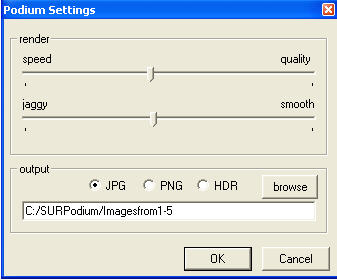
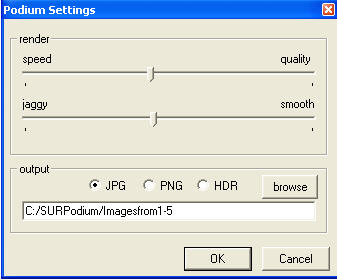
      The Settings menu is where you can control the speed vs quality and jaggy vs smooth settings. It is also where you can pick between JPG and PNG output formats and what folder you want your image files to be saved to. Settings is discussed in more detail in the Settings sections of this help desk.

      ਀         

      Preview

      ਀          

      ਀            㰀椀洀最 猀爀挀㴀∀栀琀琀瀀㨀⼀⼀瘀椀搀攀漀⸀猀甀瀀氀甀最椀渀猀⸀挀漀洀⼀椀洀愀最攀猀⼀瀀爀攀瘀椀攀眀⸀樀瀀最∀ ⼀㸀㰀⼀瀀㸀

      When Preview is on, Podium will display a Preview of the rendering as it is occurring. The default Preview image size is 230 X 150. When you pick a larger image size such as 640 X 480, the Preview will only display a small portion of your rendering as it is occurring. You can Preview the entire image size by clicking inside the Preview image area. This action will display a new window which shows a static image of the rendering. Click on the larger window to make it disappear.

      ਀         

      Sample Tutorial - applying reflections and creating lights

      ਀         㰀瀀 愀氀椀最渀㴀∀爀椀最栀琀∀㸀㰀愀 栀爀攀昀㴀∀⌀琀漀挀∀㸀䈀愀挀欀 琀漀 吀伀䌀㰀⼀愀㸀

      Download Podium Interior Sketchup file here

      ਀         

      Podium-Interior model is a simple model of a room.The goal of this exercise is to experiment with Light effect to create a new source of direct light and use reflection to simulate a mirror. Outside Sky Light will also influence the interior lighting. Turning Shadows on and off will show how sunlight can brighten an interior.

      ਀        

      Texture has already been applied to this model. SketchUp's background color has also been changed to a darker gray. Shadow settings are turned off. You can examine what materials are being used in the model by going to the SketchUp material browser and selecting the In Model tab.਀            㰀漀㨀瀀㸀㰀⼀漀㨀瀀㸀㰀⼀瀀㸀

      Also,notice that two components are being used. One is a face-me type people component.The other is of a 3D bench.If you Zoom out of the current view you can see that the model is of a room with three walls, a roof and a floor. Outside the structure there is a surface with Ashlar Stone texture to represent the ground.਀            㰀漀㨀瀀㸀㰀⼀漀㨀瀀㸀㰀⼀瀀㸀

      The facing wall has a white surface that will represent a mirror.਀            㰀漀㨀瀀㸀㰀⼀漀㨀瀀㸀㰀⼀瀀㸀 ਀          㰀栀㌀ 挀氀愀猀猀㴀∀䴀猀漀一漀爀洀愀氀∀㸀㰀愀 渀愀洀攀㴀∀稀稀攀攀开氀椀渀欀开㤀开㄀㈀㜀㄀㐀㘀㐀㄀㘀㌀∀㸀㰀猀瀀愀渀 猀琀礀氀攀㴀∀昀漀渀琀ⴀ昀愀洀椀氀礀㨀 䄀爀椀愀氀㬀∀㸀䐀椀猀瀀氀愀礀 倀漀搀椀甀洀✀猀 唀䤀 戀礀 瀀椀挀欀椀渀最 匀栀漀眀 昀爀漀洀 琀栀攀 倀漀搀椀甀洀 瀀甀氀氀 搀漀眀渀 洀攀渀甀⸀ ਀          㰀瀀 挀氀愀猀猀㴀∀䴀猀漀一漀爀洀愀氀∀㸀䰀攀琀✀猀 甀猀攀 琀栀攀 刀攀渀搀攀爀 猀椀稀攀 漀昀 㰀猀瀀愀渀 挀氀愀猀猀㴀∀匀瀀攀氀氀䔀∀㸀漀昀㰀⼀猀瀀愀渀㸀 ㈀㌀  堀 ㄀㔀  昀漀爀 琀栀攀 倀爀攀瘀椀攀眀⸀

      ਀        

      Add Reflection and Light to surfaces

      ਀          㰀瀀 挀氀愀猀猀㴀∀䴀猀漀一漀爀洀愀氀∀㸀㰀戀爀 ⼀㸀 ਀            㰀漀㨀瀀㸀㰀⼀漀㨀瀀㸀㰀⼀瀀㸀

      ਀            㰀漀㨀瀀㸀

      ਀         

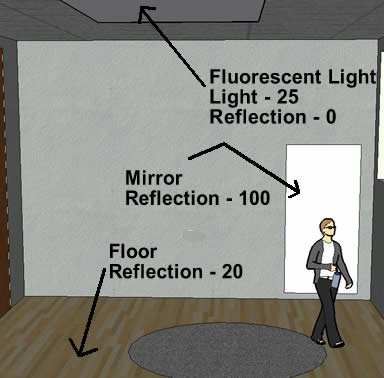
      For this example, let's add reflection to the following surfaces, a. the mirror(this is the rectangular surface on the facing wall that has Ghost White texture), b. the floor਀            㰀漀㨀瀀㸀㰀⼀漀㨀瀀㸀㰀⼀瀀㸀

      Apply Podium reflections as follows:਀            㰀漀㨀瀀㸀㰀⼀漀㨀瀀㸀㰀⼀瀀㸀

      Mirror: Select the mirror surface and while it is highlighted, use the Reflect slide bar in Podium's UI to add a reflection value of 100 for the mirror.This is the maximum reflection value.

      ਀        

      Floor: Select the floor surface and while it is highlighted, use the Reflect slide bar in Podium's UI to add a reflection value of 20 for the floor.਀          㰀漀㨀瀀㸀㰀⼀漀㨀瀀㸀㰀⼀瀀㸀 ਀          㰀瀀㸀圀攀 愀爀攀 愀氀猀漀 最漀椀渀最 琀漀 愀搀搀 愀 渀攀眀 氀椀最栀琀 猀漀甀爀挀攀 椀渀 琀栀攀 爀漀漀洀 琀漀 琀栀攀 爀攀挀琀愀渀最氀攀 漀渀 琀栀攀 挀攀椀氀椀渀最 琀漀 猀椀洀甀氀愀琀攀 愀 昀氀甀漀爀攀猀挀攀渀琀 氀椀最栀琀⸀㰀猀瀀愀渀 猀琀礀氀攀㴀∀∀㸀㰀⼀猀瀀愀渀㸀

      ਀          

      Select the rectangular surface on the ceiling and while it is highlighted, use the Light slide bar in Podium's UI to add a Light value of 25 for the fluorescent light. This is a LEM type light. It's very simple to create but LEMs are slower to render than Omni type lights discussed in the next section.
      ਀          㰀⼀瀀㸀 ਀          㰀瀀㸀㰀猀瀀愀渀 猀琀礀氀攀㴀∀昀漀渀琀ⴀ眀攀椀最栀琀㨀 戀漀氀搀㬀∀㸀刀攀渀搀攀爀 琀栀攀 匀挀攀渀攀㰀⼀猀瀀愀渀㸀

      ਀        

      Zoom,pan and rotate in SketchUp so that the room, mirror, portion of the light and a portion of the outside is visible on your computer screen. This will be the render scene.਀          㰀漀㨀瀀㸀㰀⼀漀㨀瀀㸀㰀⼀瀀㸀 ਀          㰀瀀㸀吀栀攀渀 挀氀椀挀欀 琀栀攀 刀攀渀搀攀爀 戀甀琀琀漀渀 椀渀 琀栀攀 倀漀搀椀甀洀 椀渀琀攀爀昀愀挀攀⸀ ⠀䴀愀欀攀 猀甀爀攀 琀栀攀 瀀爀攀瘀椀攀眀 戀甀琀琀漀渀 椀猀 挀栀攀挀欀攀搀⤀⸀

      ਀          㰀瀀㸀倀漀搀椀甀洀 最漀攀猀 琀栀爀漀甀最栀 猀攀瘀攀爀愀氀 椀琀攀爀愀琀椀漀渀猀 愀渀搀 礀漀甀 眀椀氀氀 渀漀琀椀挀攀 洀攀猀猀愀最攀猀 漀渀 琀栀攀 倀漀搀椀甀洀 椀渀琀攀爀昀愀挀攀 氀椀欀攀 匀栀漀漀琀椀渀最 倀栀漀琀漀渀猀Ⰰ 䈀甀椀氀搀椀渀最 䴀攀猀栀Ⰰ 刀愀礀 琀爀愀挀椀渀最Ⰰ㰀猀瀀愀渀 挀氀愀猀猀㴀∀䜀爀愀洀䔀∀㸀䄀渀琀椀㰀⼀猀瀀愀渀㸀ⴀ愀氀椀愀猀椀渀最⸀

      ਀          㰀瀀㸀圀栀攀渀 琀栀攀 洀攀猀猀愀最攀猀 栀愀瘀攀 猀琀漀瀀瀀攀搀 愀渀搀 礀漀甀 栀愀瘀攀 挀氀攀愀爀 椀洀愀最攀Ⰰ 眀栀愀琀 礀漀甀 猀攀攀 椀猀 愀 瀀爀攀瘀椀攀眀 猀椀稀攀 漀昀 礀漀甀爀 爀攀渀搀攀爀攀搀 椀洀愀最攀⸀ 匀愀瘀攀 琀栀椀猀 昀椀氀攀⸀㰀猀瀀愀渀 猀琀礀氀攀㴀∀∀㸀㰀⼀猀瀀愀渀㸀䤀琀 眀椀氀氀 戀攀 猀愀瘀攀搀 眀椀琀栀 愀 搀愀琀攀ⴀ猀琀愀洀瀀 琀漀 琀栀攀 尀匀欀攀琀挀栀唀瀀 ⠀㘀 漀爀 㜀⤀尀倀氀甀最椀渀猀尀倀漀搀椀甀洀 昀漀氀搀攀爀⸀ ⠀伀渀 琀栀攀 䴀愀挀Ⰰ 椀琀 眀椀氀氀 戀攀 猀愀瘀攀搀 椀渀 琀栀攀 䠀漀洀攀 䐀椀爀攀挀琀漀爀礀ⴀ尀䐀漀挀甀洀攀渀琀猀尀倀漀搀椀甀洀 昀漀氀搀攀爀⸀⤀㰀⼀瀀㸀

      You can change the location of where the image is saved by using the Settings menu.਀            㰀漀㨀瀀㸀㰀⼀漀㨀瀀㸀㰀⼀瀀㸀

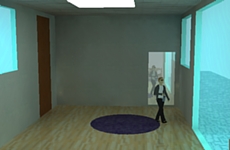
      Your preview image should look like this:
      ਀          㰀⼀瀀㸀 ਀          㰀瀀 猀琀礀氀攀㴀∀洀愀爀最椀渀ⴀ氀攀昀琀㨀  ⸀㔀椀渀㬀∀㸀

      ਀        

      As you can see it is small but renders fast. Try changing the resolution size to 852 X 480 and render it again.

      ਀          㰀瀀㸀圀愀渀琀 洀漀爀攀 氀椀最栀琀 椀渀 琀栀攀 爀漀漀洀㼀㰀⼀瀀㸀 ਀          㰀瀀㸀䤀渀挀爀攀愀猀攀 琀栀攀 䰀椀最栀琀 瘀愀氀甀攀 昀漀爀 琀栀攀 昀氀甀漀爀攀猀挀攀渀琀 氀椀最栀琀 戀礀 猀攀氀攀挀琀 琀栀攀 猀甀爀昀愀挀攀 愀渀搀 洀漀瘀椀渀最 琀栀攀 䰀椀最栀琀 猀氀椀搀攀爀 戀愀爀 琀漀 琀栀攀 氀攀昀琀⸀ 㰀戀爀 ⼀㸀

      ਀         

      You can also increase light by changing SketchUp's background color to a lighter color or by changing the color and opacity of the window texture.
      ਀          㰀⼀瀀㸀

      ਀            㰀椀洀最 猀爀挀㴀∀栀琀琀瀀㨀⼀⼀瘀椀搀攀漀⸀猀甀瀀氀甀最椀渀猀⸀挀漀洀⼀椀洀愀最攀猀⼀瀀漀搀椀甀洀ⴀ椀渀琀攀爀椀漀爀ⴀ氀椀最栀琀攀爀⸀樀瀀最∀ ⼀㸀㰀⼀瀀㸀 ਀          㰀瀀㸀一漀琀椀挀攀 栀漀眀 琀栀攀 洀椀爀爀漀爀 椀猀 爀攀昀氀攀挀琀椀渀最 琀栀攀 昀愀挀攀ⴀ洀攀 挀漀洀瀀漀渀攀渀琀✀猀 昀爀漀渀琀 瘀椀攀眀 ⠀愀猀 礀漀甀 眀漀甀氀搀 攀砀瀀攀挀琀 愀 昀愀挀攀 洀攀 挀漀洀瀀漀渀攀渀琀 琀漀 戀攀栀愀瘀攀⤀⸀ 吀爀礀 甀猀椀渀最 愀 洀甀挀栀 氀愀爀最攀爀 爀攀猀漀氀甀琀椀漀渀⸀ 一漀琀椀挀攀 栀漀眀 琀栀攀 爀攀渀搀攀爀椀渀最 猀瀀攀攀搀 猀氀漀眀猀 搀漀眀渀⸀㰀⼀瀀㸀

      You have now been exposed to some of the fundamentals of SU Podium's features. The other major feature left to explain are Omni Lights, Bump Maps, Soft Shadows, Blurred Reflection, Spot Lights and Render All scenes.਀            㰀漀㨀瀀㸀㰀⼀漀㨀瀀㸀㰀⼀瀀㸀 ਀          㰀栀㄀㸀㰀愀 渀愀洀攀㴀∀稀稀攀攀开氀椀渀欀开㄀ 开㄀㈀㜀㄀㐀㘀㐀㄀㘀㌀∀㸀㰀猀瀀愀渀 猀琀礀氀攀㴀∀昀漀渀琀ⴀ昀愀洀椀氀礀㨀 䄀爀椀愀氀㬀∀㸀㰀猀瀀愀渀 猀琀礀氀攀㴀∀昀漀渀琀ⴀ眀攀椀最栀琀㨀 戀漀氀搀㬀∀㸀䠀漀眀 琀漀 挀爀攀愀琀攀 愀渀 伀洀渀椀 䰀椀最栀琀㰀⼀猀瀀愀渀㸀 ਀          㰀⼀猀瀀愀渀㸀ⴀ 氀漀眀 挀漀猀琀 氀椀最栀琀椀渀最㰀⼀愀㸀㰀⼀栀㄀㸀㰀瀀 愀氀椀最渀㴀∀爀椀最栀琀∀㸀㰀愀 栀爀攀昀㴀∀⌀琀漀挀∀㸀䈀愀挀欀 琀漀 吀伀䌀㰀⼀愀㸀

      Omni Light is a feature that allows you to create an independent light source from SketchUp groups. Omni Light acts like a light bulb and emits light in all directions. Omni Light is different from applying Light value to one surface as we did in Tutorial 1. Omni Light allows you to assign a Light value to an entire group. That group becomes a source of light that emits light in all directions. When you render the scene the Omni Light group will disappear and only the light it is creating will appear in your rendered image.

      ਀          㰀瀀㸀夀漀甀 挀愀渀 甀猀攀 伀洀渀椀 䰀椀最栀琀 琀漀 挀爀攀愀琀攀 琀栀攀 攀昀昀攀挀琀 漀昀 愀 氀椀最栀琀 戀甀氀戀 琀栀愀琀 氀椀最栀琀猀 甀瀀 琀栀攀 攀渀琀椀爀攀 爀漀漀洀 漀爀 甀猀攀 椀琀 椀渀 愀 氀椀最栀琀 昀椀砀琀甀爀攀 琀栀愀琀 猀栀椀渀攀 甀瀀 愀 猀洀愀氀氀 愀爀攀愀⸀ 㰀⼀瀀㸀

      Omni lights will render much more quickly than LEM type lighting so it maybe the preferred type of artificial lighting.

      ਀          㰀瀀 挀氀愀猀猀㴀∀瀀开㐀∀㸀一漀琀攀㨀 䤀昀 礀漀甀 栀愀瘀攀 瀀甀爀挀栀愀猀攀搀 倀漀搀椀甀洀Ⰰ 礀漀甀 挀愀渀 爀攀最椀猀琀攀爀 愀琀 琀栀攀 匀甀瀀氀甀最椀渀猀⸀挀漀洀 猀椀琀攀 愀渀搀 栀愀瘀攀 愀挀挀攀猀猀 琀漀 琀栀攀 刀攀最椀猀琀攀爀攀搀 唀猀攀爀 瀀愀最攀⸀ 吀栀椀猀 瀀愀最攀 栀愀猀 愀渀 攀砀琀攀渀猀椀瘀攀 氀椀戀爀愀爀礀 漀昀 氀椀最栀琀 fixtures that have pre-defined omni lights applied. Use this library freely to make effective interior light sources. Even if you only have the evaluation version of Podium, you can download several sample light fixtures from the Registered User page.

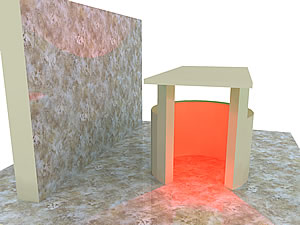
      ਀           ਀          㰀瀀 挀氀愀猀猀㴀∀猀琀礀氀攀㠀∀㸀㰀猀瀀愀渀 猀琀礀氀攀㴀∀昀漀渀琀ⴀ眀攀椀最栀琀㨀 戀漀氀搀㬀∀㸀伀洀渀椀 䰀椀最栀琀 吀甀琀漀爀椀愀氀㰀⼀猀瀀愀渀㸀㰀⼀瀀㸀 ਀          㰀瀀 挀氀愀猀猀㴀∀瀀开㈀∀㸀㰀愀 栀爀攀昀㴀∀栀琀琀瀀㨀⼀⼀眀眀眀⸀猀甀ⴀ瀀漀搀椀甀洀⸀挀漀洀⼀昀椀氀攀猀⼀瀀漀搀椀甀洀ⴀ漀洀渀椀开氀椀最栀琀⸀猀欀瀀∀ 挀氀愀猀猀㴀∀愀开㄀∀㸀䐀漀眀渀氀漀愀搀 倀漀搀椀甀洀 伀洀渀椀 䰀椀最栀琀 匀欀攀琀挀栀甀瀀 昀椀氀攀 栀攀爀攀㰀⼀愀㸀㰀⼀瀀㸀 ਀          㰀瀀㸀夀漀甀 眀椀氀氀 渀漀琀椀挀攀 愀 爀攀搀 挀甀戀攀 椀渀 琀栀攀 洀椀搀搀氀攀 漀昀 琀栀攀 洀漀搀攀氀⸀ 吀栀椀猀 挀甀戀攀 椀猀 愀 匀欀攀琀挀栀唀瀀 最爀漀甀瀀⸀ 吀栀攀 最爀漀甀瀀 眀愀猀 愀猀猀椀最渀攀搀 愀 䰀椀最栀琀 瘀愀氀甀攀 戀礀 倀漀搀椀甀洀 愀渀搀 栀愀猀 戀攀挀漀洀攀 愀渀 伀洀渀椀 䰀椀最栀琀 漀戀樀攀挀琀⸀ 㰀戀爀 ⼀㸀

      ਀          㰀瀀㸀刀攀渀搀攀爀 琀栀攀 猀挀攀渀攀 甀猀椀渀最 琀栀攀 刀攀渀搀攀爀 戀甀琀琀漀渀 椀渀 倀漀搀椀甀洀✀猀 唀䤀⸀ 㰀戀爀 ⼀㸀

      ਀          㰀瀀 挀氀愀猀猀㴀∀䴀猀漀一漀爀洀愀氀∀ 猀琀礀氀攀㌀㴀∀∀ 猀琀礀氀攀㴀∀洀愀爀最椀渀ⴀ氀攀昀琀㨀  ⸀㔀椀渀㬀∀ 猀琀礀氀攀㄀㴀∀∀㸀㰀猀瀀愀渀 猀琀礀氀攀㴀∀昀漀渀琀ⴀ昀愀洀椀氀礀㨀 䄀爀椀愀氀Ⰰ䠀攀氀瘀攀琀椀挀愀Ⰰ猀愀渀猀ⴀ猀攀爀椀昀㬀∀㸀
      ਀          㰀瀀 挀氀愀猀猀㴀∀䴀猀漀一漀爀洀愀氀∀ 猀琀礀氀攀㌀㴀∀∀ 猀琀礀氀攀㴀∀洀愀爀最椀渀ⴀ氀攀昀琀㨀  ⸀㔀椀渀㬀∀ 猀琀礀氀攀㄀㴀∀∀㸀㰀戀爀 ⼀㸀

      ਀          㰀瀀㸀一漀琀椀挀攀 栀漀眀 琀栀攀 爀攀搀 氀椀最栀琀 猀瀀椀氀氀猀 漀甀琀 昀爀漀洀 琀栀攀 挀椀爀挀甀氀愀爀 眀愀氀氀 漀渀氀礀 愀琀 琀栀攀 最愀瀀猀 漀昀 琀栀攀 眀愀氀氀⸀ 䄀氀猀漀Ⰰ 渀漀琀椀挀攀 栀漀眀 琀栀攀 伀洀渀椀 䰀椀最栀琀 漀戀樀攀挀琀 漀爀 最攀漀洀攀琀爀礀 栀愀猀 搀椀猀愀瀀瀀攀愀爀攀搀 昀爀漀洀 琀栀攀 爀攀渀搀攀爀攀搀 椀洀愀最攀⸀ 䤀昀 礀漀甀 爀漀琀愀琀攀 琀栀攀 愀渀最氀攀 漀昀 礀漀甀爀 瘀椀攀眀 愀渀搀 攀砀瀀漀猀攀 琀栀攀 戀漀琀琀漀洀 漀昀 琀栀攀 挀攀椀氀椀渀最 漀昀 琀栀攀 爀漀漀昀 愀渀搀 琀栀攀渀 爀攀渀搀攀爀Ⰰ 礀漀甀 眀椀氀氀 猀攀攀 琀栀愀琀 琀栀攀 漀洀渀椀 氀椀最栀琀 椀猀 爀攀昀氀攀挀琀攀搀 甀瀀 琀漀 琀栀攀 挀攀椀氀椀渀最 愀渀搀 琀漀 琀栀攀 漀瀀瀀漀猀椀琀攀 眀愀氀氀⸀㰀⼀瀀㸀

      As an experiment lets change the color of this Omni Light. Select the cube (do not edit the group but just select the whole group by clicking once anywhere on the cube). The cube group is highlighted. Go the Material Browser and pick green from the Colors option. Drag the paint bucket to the cube and drop the green color on the group. Now render the scene. You should have a green light glowing.
      ਀          㰀⼀瀀㸀

      How to create an Omni Light

      ਀         

      1. Create a SketchUp group from a shape.

      ਀          㰀瀀㸀㈀⸀ 䄀搀搀 愀 氀椀最栀琀 瘀愀氀甀攀 琀漀 琀栀攀 最爀漀甀瀀⸀ 䴀愀欀攀 猀甀爀攀 礀漀甀 栀愀瘀攀 猀攀氀攀挀琀攀搀 琀栀攀 最爀漀甀瀀⸀ 吀栀攀渀 最漀 琀漀 倀漀搀椀甀洀✀猀 唀䤀 愀渀搀 愀搀搀 愀 䰀椀最栀琀 瘀愀氀甀攀 琀漀 琀栀攀 猀攀氀攀挀琀攀搀 最爀漀甀瀀⸀㰀⼀瀀㸀

      3. Add a color to the group (Optional). To get a colored light effect, add color to the group. You must add color to the group and not to the individual faces of the group.
      ਀          㰀⼀瀀㸀

      You can tell if the group was assigned a color if you highlight the group, right click, pick on Entity Info. You should see an Entity Info. dialog box that says "Group" and a color in the color box. If you see no color in the Group Entity Info, the group was not assigned a color.

      ਀          㰀瀀㸀䤀琀✀猀 渀漀琀 攀猀猀攀渀琀椀愀氀 琀栀愀琀 挀漀氀漀爀 椀猀 愀搀搀攀搀 琀漀 琀栀攀 最爀漀甀瀀 琀漀 最攀琀 愀渀 漀洀渀椀 氀椀最栀琀⸀ 䤀昀 渀漀 挀漀氀漀爀 椀猀 愀搀搀攀搀Ⰰ 琀栀攀 漀洀渀椀 氀椀最栀琀 眀椀氀氀 愀瀀瀀攀愀爀 愀猀 愀 ∀眀栀椀琀攀∀ 氀椀最栀琀⸀ 㰀戀爀 ⼀㸀

      ਀          㰀瀀㸀㐀⸀ 刀攀渀搀攀爀 琀栀攀 猀挀攀渀攀⸀㰀⼀瀀㸀

      Creating your own light fixtures.

      ਀         

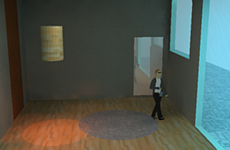
      You can create your own light fixtures with omni lights by completely enclosing an omni light group with geometry and then opening one portion of the enclosure so light can escape out in one direction.
      ਀          㰀⼀瀀㸀

      For a simple example, create an omni light cube as described above. Turn this cube into a group. Make sure you assign a Light value to the omni light. Now create a larger tube shape. Place the omni light group within the tube so that it is completely enclosed. Then open one end of the tube so that the omni light is completely enclosed except for one end. Render the scene and experiment with colors.

      ਀          㰀瀀 挀氀愀猀猀㴀∀䴀猀漀一漀爀洀愀氀∀ 猀琀礀氀攀㌀㴀∀∀ 猀琀礀氀攀㴀∀洀愀爀最椀渀ⴀ氀攀昀琀㨀  ⸀㔀椀渀㬀∀ 猀琀礀氀攀㄀㴀∀∀㸀㰀猀瀀愀渀 猀琀礀氀攀㴀∀昀漀渀琀ⴀ昀愀洀椀氀礀㨀 䄀爀椀愀氀Ⰰ䠀攀氀瘀攀琀椀挀愀Ⰰ猀愀渀猀ⴀ猀攀爀椀昀㬀∀㸀
      ਀        ਀            㰀瀀㸀㰀猀琀爀漀渀最㸀嘀椀搀攀漀 琀甀琀漀爀椀愀氀猀 漀渀 伀洀渀椀 氀椀最栀琀椀渀最㰀⼀猀琀爀漀渀最㸀㰀⼀瀀㸀

      For a more detailed video tutorial on Omni Light, see the Lighting Tutorial. Click Here for the Lighting Tutorial਀          㰀愀 栀爀攀昀㴀∀栀琀琀瀀㨀⼀⼀瘀椀搀攀漀⸀猀甀瀀氀甀最椀渀猀⸀挀漀洀⼀䰀椀最栀琀吀甀琀漀爀椀愀氀⼀㄀㘀氀椀最栀琀椀渀最⸀栀琀洀∀㸀          㰀⼀愀㸀㰀⼀瀀㸀

      Another video tutorial about LEMs and Omni lights is here਀          㰀愀 栀爀攀昀㴀∀栀琀琀瀀㨀⼀⼀瘀椀搀攀漀⸀猀甀瀀氀甀最椀渀猀⸀挀漀洀⼀倀䐀䴀ⴀ瘀椀搀攀漀ⴀ猀攀爀椀攀猀⼀瘀椀搀攀漀㌀⼀瘀椀搀攀漀㌀⸀栀琀洀氀∀㸀          㰀⼀愀㸀㰀⼀瀀㸀

      Tips #4, #14, #19 in the Tips section are also helpful. Click here

      ਀           ਀          

      Creating Spot Lights the Podium Light System using Version 1.7.3

      Back to TOC਀         㰀瀀㸀匀唀 倀漀搀椀甀洀 ㄀⸀㜀⸀㌀✀猀 渀攀眀 昀攀愀琀甀爀攀 椀猀 琀栀攀 倀漀搀椀甀洀 䰀椀最栀琀 匀礀猀琀攀洀⸀  吀栀攀 倀漀搀椀甀洀 䰀椀最栀琀 匀礀猀琀攀洀 愀氀氀漀眀猀 昀漀爀 愀渀 攀愀猀礀 眀愀礀 琀漀 挀爀攀愀琀攀 猀瀀漀琀 氀椀最栀琀 愀渀搀 漀洀渀椀 氀椀最栀琀猀⸀ 䤀琀 愀氀猀漀 愀搀搀猀 愀 猀漀昀琀 猀栀愀搀漀眀 愀爀攀愀 琀漀 琀栀攀 猀瀀漀琀 氀椀最栀琀猀 愀渀搀 瀀爀漀瘀椀搀攀猀 愀渀 椀渀琀甀椀琀椀瘀攀 眀愀礀 琀漀 瀀氀愀挀攀 漀洀渀椀 氀椀最栀琀猀⸀ 㰀⼀瀀㸀

      ਀              㰀椀洀最 猀爀挀㴀∀栀琀琀瀀㨀⼀⼀瘀椀搀攀漀⸀猀甀瀀氀甀最椀渀猀⸀挀漀洀⼀椀洀愀最攀猀⼀㄀㜀㌀ⴀ猀瀀漀琀氀椀最栀琀ⴀ猀洀⸀樀瀀最∀ ⼀㸀㰀⼀愀㸀㰀戀爀 ⼀㸀 Podium 1.7.3 Spot light (Click on the image to view a larger resolution)

      ਀          ਀         ਀       㰀瀀 愀氀椀最渀㴀∀挀攀渀琀攀爀∀ 挀氀愀猀猀㴀∀猀琀礀氀攀㈀∀㸀匀琀攀瀀猀 琀漀 甀猀攀 琀栀攀 倀漀搀椀甀洀 䰀椀最栀琀 匀礀猀琀攀洀 昀漀爀 匀唀 倀漀搀椀甀洀 ㄀⸀㜀⸀㌀㰀⼀瀀㸀

      Note: Podium Light System is for Version 1.7.3. If you are using Podium V2, Podium Light System V2 is included in the V2 installation.

      ਀         
        ਀          㰀瀀㸀吀漀 甀猀攀 琀栀攀 倀漀搀椀甀洀 䰀椀最栀琀 匀礀猀琀攀洀 昀漀爀 匀唀 倀漀搀椀甀洀 ㄀⸀㜀⸀㌀Ⰰ 昀椀爀猀琀 搀漀眀渀氀漀愀搀 愀渀搀 椀渀猀琀愀氀氀 匀唀 倀漀搀椀甀洀 ㄀⸀㜀⸀㌀ 昀爀漀洀 琀栀攀 刀攀最椀猀琀攀爀攀搀 唀猀攀爀 愀爀攀愀 椀昀 礀漀甀 栀愀瘀攀 渀漀琀 椀渀猀琀愀氀氀攀搀 椀琀 愀氀爀攀愀搀礀⸀㰀⼀瀀㸀

        Next, access the Podium Light System from the SketchUp Plugins menu.਀          圀栀攀渀 礀漀甀 搀漀 琀栀椀猀 礀漀甀 眀椀氀氀 猀攀攀 愀 爀攀搀 搀漀琀 搀椀猀瀀氀愀礀攀搀 椀渀 匀欀攀琀挀栀唀瀀⸀㰀⼀瀀㸀 ਀          㰀瀀㸀㰀椀洀最 猀爀挀㴀∀栀琀琀瀀㨀⼀⼀瘀椀搀攀漀⸀猀甀瀀氀甀最椀渀猀⸀挀漀洀⼀椀洀愀最攀猀⼀栀甀搀⸀樀瀀最∀ ⼀㸀㰀⼀瀀㸀

        Press your Control key (Alt key on the Mac) and you will see a Heads Up Display menu like the image above.

        ਀          㰀瀀㸀一攀砀琀Ⰰ 眀椀琀栀 琀栀攀 䌀漀渀琀爀漀氀 欀攀礀 栀攀氀搀 搀漀眀渀Ⰰ 氀攀昀琀 洀漀甀猀攀 挀氀椀挀欀 漀渀 㰀攀洀㸀漀洀渀椀㰀⼀攀洀㸀 漀爀 㰀攀洀㸀猀瀀漀琀㰀⼀攀洀㸀 琀漀 挀栀漀漀猀攀 琀栀攀 琀礀瀀攀 漀昀 氀椀最栀琀椀渀最⸀  吀栀攀 搀攀昀愀甀氀琀 氀椀最栀琀椀渀最 椀猀 㰀攀洀㸀漀洀渀椀㰀⼀攀洀㸀 眀栀椀挀栀 椀猀 猀栀漀眀渀 戀礀 㰀攀洀㸀䀀琀礀瀀攀氀椀最栀琀㨀㄀㰀⼀攀洀㸀⸀  吀栀椀猀 眀椀氀氀 挀栀愀渀最攀 琀漀㰀攀洀㸀 䀀琀礀瀀攀氀椀最栀琀㨀㈀ 㰀⼀攀洀㸀椀昀 礀漀甀 挀氀椀挀欀 漀渀 㰀攀洀㸀猀瀀漀琀㰀⼀攀洀㸀⸀㰀⼀瀀㸀

        Drag your left mouse cursor in the power rectangle to increase or decrease light power.

        ਀          㰀瀀 愀氀椀最渀㴀∀挀攀渀琀攀爀∀㸀㰀猀琀爀漀渀最㸀䌀爀攀愀琀椀渀最 匀瀀漀琀 䰀椀最栀琀猀 眀椀琀栀 倀䰀匀㰀⼀猀琀爀漀渀最㸀㰀⼀瀀㸀
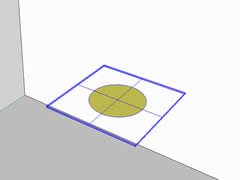
          ਀            㰀氀椀㸀䄀昀琀攀爀 挀氀椀挀欀椀渀最 漀渀 㰀攀洀㸀猀瀀漀琀㰀⼀攀洀㸀Ⰰ 爀攀氀攀愀猀攀 琀栀攀 䌀漀渀琀爀漀氀 欀攀礀 ⠀䄀氀琀 欀攀礀 漀渀 琀栀攀 䴀愀挀⤀⸀  䄀 爀攀搀 搀漀琀 椀猀 搀椀猀瀀氀愀礀攀搀 椀渀 匀欀攀琀挀栀唀瀀⸀  䴀漀瘀攀 礀漀甀爀 挀甀爀猀漀爀 愀渀搀 挀氀椀挀欀 漀渀 愀 昀愀挀攀 漀爀 愀渀 椀渀昀攀爀攀渀挀攀 瀀漀椀渀琀 ⠀猀甀挀栀 愀猀 愀渀 椀渀琀攀爀猀攀挀琀椀漀渀 漀爀 攀渀搀 瀀漀椀渀琀⤀ 㰀⼀氀椀㸀
        • Drag the cross hairs in a perpendicular direction away from the first inference point. Find a second point and click in space. This can also be an inference point. This will be position for the spot light group.
        • ਀             㰀氀椀㸀一攀砀琀Ⰰ  挀氀椀挀欀 漀渀 愀 昀愀挀攀 琀栀愀琀 眀椀氀氀 爀攀昀氀攀挀琀 琀栀攀 猀瀀漀琀 氀椀最栀琀 戀攀愀洀⸀ 吀栀椀猀 眀椀氀氀 搀攀琀攀爀洀椀渀攀 琀栀攀 搀椀爀攀挀琀椀漀渀 琀栀攀 猀瀀漀琀 氀椀最栀琀 戀攀愀洀 眀椀氀氀 戀攀 攀洀椀琀琀攀搀⸀ 㰀⼀氀椀㸀
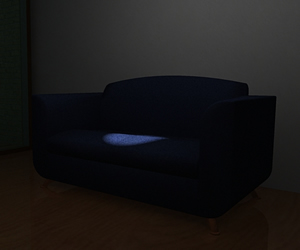
        • Render. You will notice a circular spot light with soft shadow edges will be created on the face that was selected.
        • ਀              㰀氀椀㸀䔀搀椀琀⸀  夀漀甀 挀愀渀 椀渀挀爀攀愀猀攀 漀爀 搀攀挀爀攀愀猀攀 琀栀攀 猀瀀漀琀 氀椀最栀琀 瀀漀眀攀爀 戀礀 猀攀氀攀挀琀椀渀最 琀栀攀 猀瀀漀琀 氀椀最栀琀 最爀漀甀瀀 愀渀搀 洀漀瘀椀渀最 琀栀攀 氀椀最栀琀 猀氀椀搀攀爀 椀渀 琀栀攀 倀漀搀椀甀洀 搀椀愀氀漀最 戀漀砀⸀  夀漀甀 挀愀渀 愀氀猀漀 洀漀瘀攀 琀栀攀 瀀漀猀椀琀椀漀渀 漀昀 猀瀀漀琀 氀椀最栀琀 甀猀椀渀最 琀栀攀 匀欀攀琀挀栀唀瀀 洀漀瘀攀 琀漀漀氀⸀㰀⼀氀椀㸀
        • Beam angle. There is no beam angle control on the Podium Light System for 1.7.3 spot lights. (If you need beam angle or width control, you will need to use the PLS for Version 2 Beta). However, you can control the size of the spot light light by selecting the spot light group and using the Scale tool in SketchUp. Scaling the spot light group will change the diameter of the spot light light. Some examples are shown below.
        • ਀          㰀⼀甀氀㸀

          ਀               ਀              㰀椀洀最 猀爀挀㴀∀栀琀琀瀀㨀⼀⼀瘀椀搀攀漀⸀猀甀瀀氀甀最椀渀猀⸀挀漀洀⼀椀洀愀最攀猀⼀洀攀搀椀甀洀ⴀ猀瀀漀琀氀椀最栀琀⸀樀瀀最∀ ⼀㸀
          ਀              㰀椀洀最 猀爀挀㴀∀栀琀琀瀀㨀⼀⼀瘀椀搀攀漀⸀猀甀瀀氀甀最椀渀猀⸀挀漀洀⼀椀洀愀最攀猀⼀爀攀最甀氀愀爀ⴀ猀瀀漀琀氀椀最栀琀⸀樀瀀最∀ ⼀㸀 ਀               ਀          㰀瀀㸀

        ਀           

        Creating Omni Lights with PLS

        ਀            㰀甀氀㸀
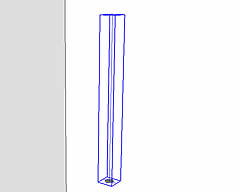
      • After clicking on omni, release the Control key. A red dot is displayed in SketchUp. Move your cursor and click on a face or an inference point (such as an intersection or end point)
      • ਀             㰀氀椀㸀䐀爀愀最 琀栀攀 挀爀漀猀猀 栀愀椀爀猀 椀渀 愀 瀀攀爀瀀攀渀搀椀挀甀氀愀爀 搀椀爀攀挀琀椀漀渀 愀眀愀礀 昀爀漀洀 琀栀攀 昀椀爀猀琀 椀渀昀攀爀攀渀挀攀 瀀漀椀渀琀⸀  䘀椀渀搀 愀 猀攀挀漀渀搀 瀀漀椀渀琀 愀渀搀 挀氀椀挀欀 椀渀 猀瀀愀挀攀⸀  吀栀椀猀 挀愀渀 愀氀猀漀 戀攀 愀渀 椀渀昀攀爀攀渀挀攀 瀀漀椀渀琀⸀ 㰀⼀氀椀㸀 ਀              㰀氀椀㸀刀攀渀搀攀爀⸀㰀⼀氀椀㸀
      • Edit. You can increase or decrease the omni light power by selecting the omni light group and moving the light slider in the Podium dialog box. You can also move the position of omni light using the SketchUp move tool.
      • ਀              
      ਀         

      Creating Spot Lights - the old way

      ਀           㰀琀愀戀氀攀 眀椀搀琀栀㴀∀㤀 ─∀ 挀攀氀氀猀瀀愀挀椀渀最㴀∀㄀ ∀ 愀氀椀最渀㴀∀挀攀渀琀攀爀∀㸀 ਀      㰀琀爀㸀
    ਀          㰀椀洀最 眀椀搀琀栀㴀∀㈀㐀 ∀ 栀攀椀最栀琀㴀∀㄀㠀 ∀ 猀爀挀㴀∀栀琀琀瀀㨀⼀⼀瘀椀搀攀漀⸀猀甀瀀氀甀最椀渀猀⸀挀漀洀⼀椀洀愀最攀猀⼀猀瀀漀琀瀀爀攀爀攀渀搀ⴀ猀洀⸀樀瀀最∀ ⼀㸀㰀⼀琀搀㸀 ਀          㰀椀洀最 眀椀搀琀栀㴀∀㈀㐀 ∀ 栀攀椀最栀琀㴀∀㄀㠀 ∀ 猀爀挀㴀∀栀琀琀瀀㨀⼀⼀瘀椀搀攀漀⸀猀甀瀀氀甀最椀渀猀⸀挀漀洀⼀椀洀愀最攀猀⼀猀瀀漀琀氀椀最栀琀ⴀ爀攀渀搀攀爀攀搀㄀⸀樀瀀最∀ ⼀㸀㰀⼀琀搀㸀
    ਀ 

    There is a much easier way of creating spot lights in Version 1.7.3 using the Podium Light System. However, the older way is still useful and can give you size controls that does not exist in the Podium Light System.

    ਀          㰀瀀㸀䤀昀 礀漀甀 愀氀爀攀愀搀礀 栀愀瘀攀 愀 昀椀爀洀 甀渀搀攀爀猀琀愀渀搀椀渀最 漀昀 倀漀搀椀甀洀 氀椀最栀琀椀渀最Ⰰ 攀猀瀀攀挀椀愀氀氀礀 伀洀渀椀 氀椀最栀琀猀Ⰰ 栀攀爀攀 椀猀 猀漀洀攀琀栀椀渀最 琀漀 攀砀瀀攀爀椀洀攀渀琀 眀椀琀栀⸀ 匀瀀漀琀氀椀最栀琀猀 琀愀欀攀 洀漀爀攀 琀椀洀攀 琀漀 猀攀琀 甀瀀Ⰰ 樀甀猀琀 愀猀 漀洀渀椀猀 琀愀欀攀 洀漀爀攀 琀椀洀攀 琀漀 猀攀琀 甀瀀 琀栀愀渀 䰀䔀䴀猀⸀㰀⼀瀀㸀

    Spotlights can be used to manipulate light falloff. The falloff is determined by the length of the line drawn out from the group. In the above images, you see a “scallop” effect is achieved.

    ਀          㰀瀀㸀 䐀漀眀渀氀漀愀搀 琀栀攀 匀瀀漀琀氀椀最栀琀开琀攀猀琀开猀挀攀渀攀⸀猀欀瀀 昀漀爀 猀漀洀攀 攀砀愀洀瀀氀攀猀 漀昀 猀瀀漀琀氀椀最栀琀猀⸀ 㰀愀 栀爀攀昀㴀∀栀琀琀瀀㨀⼀⼀眀眀眀⸀猀甀ⴀ瀀漀搀椀甀洀⸀挀漀洀⼀昀椀氀攀猀⼀匀瀀漀琀氀椀最栀琀开琀攀猀琀开猀挀攀渀攀⸀猀欀瀀∀ 挀氀愀猀猀㴀∀猀琀礀氀攀㐀∀㸀㰀猀瀀愀渀 猀琀礀氀攀㴀∀琀攀砀琀ⴀ搀攀挀漀爀愀琀椀漀渀㨀 甀渀搀攀爀氀椀渀攀㬀∀㸀 䌀氀椀挀欀 䠀攀爀攀 琀漀 搀漀眀渀氀漀愀搀⸀㰀⼀猀瀀愀渀㸀㰀⼀愀㸀吀栀攀渀 愀猀猀椀最渀 氀椀最栀琀 愀琀琀爀椀戀甀琀攀猀 琀漀 攀愀挀栀 猀瀀漀琀氀椀最栀琀 最爀漀甀瀀 愀渀搀 琀栀攀渀 爀攀渀搀攀爀⸀㰀⼀瀀㸀

    To create a spotlight:

    ਀          㰀甀氀㸀㄀⸀ 匀琀愀爀琀 戀礀 洀愀欀椀渀最 愀 最爀漀甀瀀 愀猀 椀昀 礀漀甀 眀攀爀攀 洀愀欀椀渀最 愀渀 漀洀渀椀 氀椀最栀琀 戀甀琀Ⰰ 搀漀 渀漀琀 最椀瘀攀 琀栀攀 最爀漀甀瀀 愀 氀椀最栀琀 瘀愀氀甀攀⸀ ਀          㰀瀀㸀

    ਀          㰀甀氀㸀㈀⸀ 䘀爀漀洀 琀栀攀 挀攀渀琀攀爀 漀昀 琀栀攀 最爀漀甀瀀Ⰰ 搀爀愀眀 愀渀 攀搀最攀 ⠀氀椀渀攀⤀ 攀砀琀攀渀搀椀渀最 愀眀愀礀 昀爀漀洀 琀栀攀 最爀漀甀瀀⸀ 䤀渀 琀栀椀猀 攀砀愀洀瀀氀攀 琀栀攀 氀椀渀攀 眀愀猀 ㈀ 洀攀琀攀爀猀⸀ ਀          㰀甀氀㸀㌀⸀ 䌀漀洀戀椀渀攀 椀渀 愀 最爀漀甀瀀 琀栀攀 攀渀琀椀琀椀攀猀 挀爀攀愀琀攀搀 椀渀 猀琀攀瀀猀 ㄀ 愀渀搀 ㈀⸀ ਀          㰀瀀㸀

    ਀          㰀甀氀㸀 㐀⸀ 䜀椀瘀攀 琀栀攀 最爀漀甀瀀 昀爀漀洀 猀琀攀瀀 ㌀ 愀 氀椀最栀琀 瘀愀氀甀攀⸀ ਀          㰀甀氀㸀㔀⸀ 刀攀渀搀攀爀 琀漀 猀攀攀 琀栀攀 猀瀀漀琀氀椀最栀琀 攀昀昀攀挀琀⸀ ਀          㰀瀀㸀 䤀渀 琀栀攀 琀眀漀 椀洀愀最攀猀 愀琀 琀栀攀 琀漀瀀 漀昀 琀栀攀 瀀愀最攀Ⰰ 礀漀甀 猀攀攀 漀渀攀 椀洀愀最攀 眀椀琀栀 猀瀀漀琀氀椀最栀琀 最爀漀甀瀀猀 愀渀搀 愀渀漀琀栀攀爀 椀洀愀最攀 眀椀琀栀 爀攀渀搀攀爀攀搀猀瀀漀琀氀椀最栀琀猀⸀ 䐀漀眀渀氀漀愀搀 琀栀攀 匀瀀漀琀氀椀最栀琀开琀攀猀琀开猀挀攀渀攀⸀猀欀瀀 昀漀爀 猀漀洀攀 攀砀愀洀瀀氀攀猀 漀昀 猀瀀漀琀氀椀最栀琀猀⸀ 㰀愀 栀爀攀昀㴀∀栀琀琀瀀㨀⼀⼀眀眀眀⸀猀甀ⴀ瀀漀搀椀甀洀⸀挀漀洀⼀昀椀氀攀猀⼀匀瀀漀琀氀椀最栀琀开琀攀猀琀开猀挀攀渀攀⸀猀欀瀀∀ 琀愀爀最攀琀㴀∀开戀氀愀渀欀∀㸀㰀猀瀀愀渀 猀琀礀氀攀㴀∀琀攀砀琀ⴀ搀攀挀漀爀愀琀椀漀渀㨀 甀渀搀攀爀氀椀渀攀㬀∀㸀 䐀漀眀渀氀漀愀搀 栀攀爀攀⸀㰀⼀猀瀀愀渀㸀㰀⼀愀㸀㰀⼀瀀㸀
    Assign light values to each spotlight group and render the model with Podium. This will give you some idea of how spotlights work.

    ਀          ਀           

    Blurred Reflections

    Back to TOC਀          

    Blurred Reflection option allows you to assign blurred reflections to a face or faces. With Podium's "normal" reflections, faces will directly reflect the surrounding environment, Podium lights, geometry and textures. If you apply blurred reflections to a face, the reflections will be subtle and less "glossy" than normal reflections.
    ਀          㰀⼀瀀㸀

    Blurry reflections are applied the same way that "normal" reflections are applied. First check the blurred reflections box on the Podium UI. Then select the face or faces to add reflections to. While the faces are highlighted, use the reflect slide bar to choose the amount of reflection.

    ਀          

    To understand more about Blurred reflection please read SU Podium 1.7.x Blurred Reflections
    ਀            漀爀 眀愀琀挀栀 琀栀攀 㰀愀 栀爀攀昀㴀∀栀琀琀瀀㨀⼀⼀眀眀眀⸀礀漀甀琀甀戀攀⸀挀漀洀⼀眀愀琀挀栀㼀瘀㴀甀㌀䌀䤀氀娀最䠀䄀伀䔀∀㸀匀唀 倀漀搀椀甀洀 ㄀⸀㜀 䈀氀甀爀爀攀搀 愀渀搀 圀椀稀愀爀搀 嘀椀搀攀漀㰀⼀愀㸀㰀⼀瀀㸀 ਀          㰀栀㄀㸀㰀愀 渀愀洀攀㴀∀稀稀攀攀开氀椀渀欀开㄀㐀开㄀㈀㜀㄀㐀㘀㐀㄀㘀㌀∀㸀匀攀琀琀椀渀最猀㰀⼀愀㸀㰀⼀栀㄀㸀 ਀          㰀瀀 挀氀愀猀猀㴀∀瀀开㄀㘀∀㸀

    ਀          㰀瀀 挀氀愀猀猀㴀∀瀀开㄀㘀∀㸀㰀戀爀 ⼀㸀

    ਀          㰀瀀 挀氀愀猀猀㴀∀瀀开㈀㌀∀㸀㰀猀瀀愀渀 挀氀愀猀猀㴀∀猀瀀愀渀开㄀∀㸀吀栀攀 匀攀琀琀椀渀最猀 洀攀渀甀 挀愀渀 栀攀氀瀀 礀漀甀 椀渀挀爀攀愀猀攀 漀爀 搀攀挀爀攀愀猀攀 琀栀攀 猀瀀攀攀搀 漀爀 焀甀愀氀椀琀礀 漀昀 琀栀攀 爀攀渀搀攀爀 搀攀瀀攀渀搀椀渀最 漀渀 眀栀愀琀 漀瀀琀椀漀渀猀 礀漀甀 挀栀漀漀猀攀⸀ 吀栀攀 匀攀琀琀椀渀最猀 洀攀渀甀 愀氀猀漀 愀氀氀漀眀猀 礀漀甀 琀漀 搀攀挀椀搀攀 眀栀攀爀攀 礀漀甀 眀愀渀琀 琀漀 猀愀瘀攀 礀漀甀爀 爀攀渀搀攀爀攀搀 椀洀愀最攀 昀椀氀攀猀 愀渀搀 眀栀愀琀 昀椀氀攀 琀礀瀀攀 琀漀 猀愀瘀攀 椀洀愀最攀猀 琀漀⸀ 吀栀攀 猀攀琀琀椀渀最猀 甀猀攀爀 椀渀琀攀爀昀愀挀攀 椀猀 愀挀挀攀猀猀攀搀 戀礀 挀氀椀挀欀椀渀最 漀渀 琀栀攀 䄀爀爀漀眀 椀挀漀渀 椀渀 倀漀搀椀甀洀 洀愀椀渀 甀猀攀爀 椀渀琀攀爀昀愀挀攀⸀ 吀栀攀 瀀爀攀挀攀搀椀渀最 洀攀渀甀 眀椀氀氀 愀氀氀漀眀 礀漀甀 琀漀 瀀椀挀欀 匀攀琀琀椀渀最猀 眀栀椀挀栀 眀椀氀氀 戀爀椀渀最 甀瀀 琀栀攀 匀攀琀琀椀渀最猀 甀猀攀爀 椀渀琀攀爀昀愀挀攀⸀㰀⼀猀瀀愀渀㸀㰀猀瀀愀渀 挀氀愀猀猀㴀∀猀瀀愀渀开㄀∀㸀㰀⼀猀瀀愀渀㸀㰀猀瀀愀渀 挀氀愀猀猀㴀∀猀瀀愀渀开㄀∀㸀吀栀攀 匀攀琀琀椀渀最猀 椀渀琀攀爀昀愀挀攀 椀猀 搀椀瘀椀搀攀搀 椀渀琀漀 琀眀漀 猀攀挀琀椀漀渀猀⸀ 吀栀攀 琀漀瀀 刀攀渀搀攀爀 猀攀挀琀椀漀渀 椀猀 昀漀爀 挀漀渀琀爀漀氀氀椀渀最 琀栀攀 猀瀀攀攀搀 愀渀搀 猀洀漀漀琀栀渀攀猀猀 漀昀 琀栀攀 爀攀渀搀攀爀攀搀 椀洀愀最攀⸀ 吀栀攀 戀漀琀琀漀洀 猀攀挀琀椀漀渀 椀猀 昀漀爀 琀栀攀 漀甀琀瀀甀琀 昀椀氀攀⸀ 㰀戀爀 ⼀㸀

    ਀         

    Render Settings

    ਀          

    Podium provides two types of render settings that will affect how fast or at what quality the rendering will be done.

    ਀           ਀              匀瀀攀攀搀⼀ Quality slider bar controls how many ray tracing passes will be conducted during the rendering. If you are looking for "quick and dirty" results, push the slider bar toward Speed.

    ਀          㰀瀀 挀氀愀猀猀㴀∀瀀开㈀㌀∀㸀㰀猀瀀愀渀 挀氀愀猀猀㴀∀猀瀀愀渀开㄀∀㸀㰀⼀猀瀀愀渀㸀㰀猀瀀愀渀 挀氀愀猀猀㴀∀猀瀀愀渀开㄀∀㸀㰀戀爀 ⼀㸀 Another slider bar controls the jaggy vs smoothness of the rendered image. An often used term for controlling how smooth or jaggy an image should look is called anti-aliasing. Generally rule of thumb for these two controls is you will get more speed and less quality the further you move the slider bars left. But speed and quality will also depend on the resolution size. You will also notice a considerable drop in the speed of rendering the further right you take the slider bars.
    ਀              㰀⼀猀瀀愀渀㸀㰀⼀瀀㸀

    Note: A good practice is to first render the image at higher speeds, lower quality and smaller resolutions to examine things like reflection, lighting and the textures you are working with. Once you are happy with these things, render the image at higher resolutions and higher quality and smoothness settings.

    ਀         

    ਀            伀甀琀瀀甀琀 匀攀琀琀椀渀最猀⸀ 夀漀甀 挀愀渀 甀猀攀 琀栀攀 漀甀琀瀀甀琀 猀攀琀琀椀渀最猀 琀漀 猀愀瘀攀 琀栀攀 爀攀渀搀攀爀攀搀 椀洀愀最攀 昀椀氀攀猀 椀渀 愀 昀漀氀搀攀爀 漀昀 礀漀甀爀 挀栀漀椀挀攀⸀ 夀漀甀 挀愀渀 愀氀猀漀 挀栀漀漀猀攀 JPG,਀               倀一䜀 漀爀 䠀䐀刀 昀爀漀洀 琀栀攀 伀甀琀瀀甀琀 漀瀀琀椀漀渀猀⸀ DR file type is new to Podium 1.6. High dynamic range (HDR) renderings allow you to render a greater range of reflection and light detail than JPG or PNG files would produce.

    ਀        

    Podium Wizard

    Back to TOC਀          㰀瀀㸀

    ਀         

    SU Podium 1.7.x includes Podium Wizard and Podium Tools utilities (Reset). These two utilities are installed and displayed in the Podium 1.7 menu.
    ਀                㰀⼀猀瀀愀渀㸀㰀⼀猀瀀愀渀㸀㰀⼀瀀㸀 ਀          㰀瀀㸀㰀猀瀀愀渀 猀琀礀氀攀㴀∀昀漀渀琀ⴀ眀攀椀最栀琀㨀 戀漀氀搀㬀∀㸀倀漀搀椀甀洀 圀椀稀愀爀搀 昀漀爀 倀漀搀椀甀洀 ㄀⸀㜀⸀砀㰀⼀猀瀀愀渀㸀㰀⼀瀀㸀

    Click the following link to watch the video tutorial on Podium Wizard. Click Here.

    ਀          㰀瀀㸀吀栀攀 倀漀搀椀甀洀 圀椀稀愀爀搀 栀愀猀 琀眀漀 昀甀渀挀琀椀漀渀猀⸀ 伀渀攀 椀猀 琀漀 挀栀攀挀欀 琀栀攀 匀欀攀琀挀栀唀瀀 洀漀搀攀氀 昀漀爀 琀栀攀 渀甀洀戀攀爀 漀昀 倀漀搀椀甀洀 爀攀昀氀攀挀琀椀瘀攀 昀愀挀攀猀Ⰰ 氀椀最栀琀猀 ⠀䰀䔀䴀⤀ 愀渀搀 漀洀渀椀 氀椀最栀琀猀⸀ 吀栀椀猀 昀甀渀挀琀椀漀渀 眀椀氀氀 最椀瘀攀 礀漀甀 愀渀 椀搀攀愀 漀昀 琀栀攀 愀洀漀甀渀琀 漀昀 挀漀洀瀀甀琀椀渀最 瀀漀眀攀爀 倀漀搀椀甀洀 渀攀攀搀猀 琀漀 挀爀攀愀琀攀 愀 爀攀渀搀攀爀攀搀 椀洀愀最攀⸀ 吀栀攀 栀椀最栀攀爀 琀栀攀 渀甀洀戀攀爀 漀昀 氀椀最栀琀猀 ⠀䰀䔀䴀⤀Ⰰ 爀攀昀氀攀挀琀椀瘀攀 昀愀挀攀猀 愀渀搀 漀洀渀椀 氀椀最栀琀猀 琀栀攀 洀漀搀攀氀 栀愀猀Ⰰ 琀栀攀 氀漀渀最攀爀 椀琀 眀椀氀氀 琀愀欀攀 琀漀 爀攀渀搀攀爀⸀㰀⼀瀀㸀

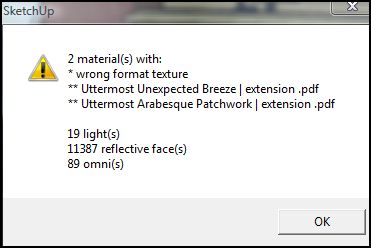
    The second function in the Podium Wizard is to check for textures that will not render. If you have imported texture images in your model that have no extensions or unaccepted file extensions such as .pdf or .eps, the Podium Wizard will display an error message. The image below is an example of the error message and the analysis of the model.

    ਀          㰀瀀㸀

    ਀          㰀瀀㸀倀漀搀椀甀洀 ㄀⸀㜀⠀ 愀渀搀 愀戀漀瘀攀⤀ 愀氀猀漀 椀渀挀氀甀搀攀猀 愀渀 攀爀爀漀爀 搀攀琀攀挀琀椀漀渀 瀀爀漀最爀愀洀 琀栀愀琀 爀甀渀猀 愀昀琀攀爀 琀栀攀 爀攀渀搀攀爀椀渀最 瀀爀漀挀攀猀猀 椀猀 挀漀洀瀀氀攀琀攀搀⸀ 䤀昀 琀栀攀爀攀 愀爀攀 愀渀礀 琀攀砀琀甀爀攀猀 琀栀愀琀 瀀漀琀攀渀琀椀愀氀氀礀 眀椀氀氀 渀漀琀 爀攀渀搀攀爀Ⰰ 愀渀 攀爀爀漀爀 洀攀猀猀愀最攀 椀猀 搀椀猀瀀氀愀礀攀搀 眀椀琀栀椀渀 琀栀攀 倀漀搀椀甀洀 搀椀愀氀漀最 戀漀砀⸀ 吀栀攀 椀洀愀最攀 戀攀氀漀眀 椀猀 栀漀眀 琀栀攀 洀攀猀猀愀最攀 眀椀氀氀 愀瀀瀀攀愀爀⸀㰀⼀瀀㸀

    ਀          㰀椀洀最 猀爀挀㴀∀栀琀琀瀀㨀⼀⼀瘀椀搀攀漀⸀猀甀瀀氀甀最椀渀猀⸀挀漀洀⼀椀洀愀最攀猀⼀攀爀爀漀爀ⴀ搀攀琀攀挀琀攀搀ⴀ洀猀最⸀䨀倀䜀∀ ⼀㸀㰀⼀瀀㸀

    The message is "errors detected. run wizard.". If you see this error after rendering, it will be a good idea to run the Podium Wizard.

    ਀          㰀瀀㸀㰀猀瀀愀渀 猀琀礀氀攀㴀∀昀漀渀琀ⴀ眀攀椀最栀琀㨀 戀漀氀搀㬀∀㸀䌀漀爀爀攀挀琀椀渀最 瀀爀漀戀氀攀洀 洀愀琀攀爀椀愀氀猀 ⠀椀洀瀀漀爀琀攀搀 琀攀砀琀甀爀攀猀⤀㰀⼀猀瀀愀渀㸀㰀⼀瀀㸀 ਀          㰀瀀㸀䄀昀琀攀爀 爀甀渀渀椀渀最 倀漀搀椀甀洀 圀椀稀愀爀搀 愀渀搀 最攀琀琀椀渀最 愀渀 攀爀爀漀爀 洀攀猀猀愀最攀 爀攀最愀爀搀椀渀最 洀愀琀攀爀椀愀氀猀 眀椀琀栀 ∀眀爀漀渀最 昀漀爀洀愀琀 琀攀砀琀甀爀攀∀ 漀爀 ∀渀漀 攀砀琀攀渀猀椀漀渀 琀攀砀琀甀爀攀∀Ⰰ 椀琀 眀椀氀氀 戀攀 椀洀瀀漀爀琀愀渀琀 琀漀 洀愀欀攀 渀愀洀攀 挀漀爀爀攀挀琀椀漀渀猀 琀漀 琀栀攀 瀀爀漀戀氀攀洀 洀愀琀攀爀椀愀氀猀 ⠀椀洀瀀漀爀琀攀搀 琀攀砀琀甀爀攀猀⤀ 漀爀 搀攀氀攀琀椀渀最 琀栀攀洀 昀爀漀洀 琀栀攀 匀欀攀琀挀栀唀瀀 洀漀搀攀氀⸀ 刀攀渀愀洀椀渀最 琀栀攀 洀愀琀攀爀椀愀氀猀 猀漀 琀栀攀礀 栀愀瘀攀 挀漀爀爀攀挀琀 攀砀琀攀渀猀椀漀渀猀 椀猀 渀漀琀 渀攀挀攀猀猀愀爀椀氀礀 愀 猀椀洀瀀氀攀 琀愀猀欀⸀ 䐀攀氀攀琀椀渀最 琀栀攀 瀀爀漀戀氀攀洀 洀愀琀攀爀椀愀氀猀 椀猀 愀 氀漀琀 攀愀猀椀攀爀 愀氀琀栀漀甀最栀 眀椀氀氀 栀愀瘀攀 愀渀 椀洀瀀愀挀琀 漀渀 栀漀眀 礀漀甀爀 爀攀渀搀攀爀攀搀 椀洀愀最攀 眀椀氀氀 氀漀漀欀⸀㰀⼀瀀㸀

    To correct material problems, the first thing to do is to purge your model of unused materials. This will have a positive effect of deleting unneeded materials and potentially make your model smaller. To purge, open your SketchUp Material Browser. For Windows users, click on the In Model icon and click the Arrow icon. Then select Purge Unused. For Mac users, from the List pull down menu, pick Purge Unused.

    ਀          㰀瀀㸀吀栀攀 渀攀砀琀 琀愀猀欀 椀猀 琀漀 攀椀琀栀攀爀 搀攀氀攀琀攀 瀀爀漀戀氀攀洀 洀愀琀攀爀椀愀氀猀 漀爀 爀攀渀愀洀攀 琀栀攀洀 猀漀 倀漀搀椀甀洀 眀椀氀氀 爀攀渀搀攀爀 琀栀攀洀⸀ 䤀渀 洀漀猀琀 挀愀猀攀猀Ⰰ 倀漀搀椀甀洀 圀椀稀愀爀搀 眀椀氀氀 最椀瘀攀 礀漀甀 愀 ∀眀爀漀渀最 昀漀爀洀愀琀 琀攀砀琀甀爀攀猀∀ 眀栀攀渀 椀洀瀀漀爀琀攀搀 琀攀砀琀甀爀攀 ⠀猀⤀ 椀猀 渀漀琀 愀 戀椀琀 洀愀瀀瀀攀搀 最爀愀瀀栀椀挀 昀漀爀洀愀琀⸀ 䄀挀挀攀瀀琀攀搀 昀漀爀洀愀琀猀 愀爀攀 ⸀樀瀀最Ⰰ ⸀瀀渀最 愀渀搀 ⸀最椀昀⸀ 嘀攀挀琀漀爀 最爀愀瀀栀椀挀 昀漀爀洀愀琀猀 猀甀挀栀 愀猀 ⸀瀀搀昀 愀渀搀 ⸀攀瀀猀 愀爀攀 琀爀攀愀琀攀搀 愀猀 攀爀爀漀爀猀⸀ 吀栀攀 圀椀稀愀爀搀 眀椀氀氀 最椀瘀攀 礀漀甀 愀 ∀渀漀 攀砀琀攀渀猀椀漀渀 琀攀砀琀甀爀攀∀ 洀攀猀猀愀最攀 眀栀攀渀 琀栀攀爀攀 愀爀攀 渀漀 昀椀氀攀 攀砀琀攀渀猀椀漀渀猀 琀漀 礀漀甀爀 䨀倀䔀䜀Ⰰ 䜀䤀䘀 漀爀 倀一䜀 昀椀氀攀⸀㰀⼀瀀㸀

    You can easily delete SketchUp materials by using the SketchUp Material Browser and selecting and then deleting or removing the "problem" material. However, deleting a material may have an impact on the look and feel of your rendered image. The other option is to add an extension to the material, in the case that an extension is missing, or renaming the material, in the case that the imported texture is a .pdf or .eps file. There are various ways renaming your imported textures. The easiest method is finding the original imported image in your Windows or Mac computer, rename it so it has a .jpg, gif or .png extensions and then re-importing the image as a texture. However, if the case is that the imported texture is embedded in the model and you can not access the original imported texture, you will need to save the texture as an image from SketchUp's material browser to a folder on your computer. After saving the file, rename it with a .jpg, .gif or .png extension. When you have either renamed or deleted the "problem" material, run the Podium Wizard again to see if it has recognized the corrections. Then render your model again.

    ਀          㰀瀀㸀㰀猀瀀愀渀 猀琀礀氀攀㴀∀昀漀渀琀ⴀ眀攀椀最栀琀㨀 戀漀氀搀㬀∀㸀刀攀猀攀琀㰀⼀猀瀀愀渀㸀㰀⼀瀀㸀 ਀          㰀瀀㸀吀栀攀 刀攀猀攀琀 洀攀渀甀 栀愀猀 琀眀漀 猀甀戀 洀攀渀甀猀㨀 刀攀猀攀琀 䴀漀搀攀氀 愀渀搀 刀攀猀攀琀 䌀漀漀爀搀椀渀愀琀攀猀⸀ 刀攀猀攀琀 䴀漀搀攀氀 椀猀 琀栀攀 猀愀洀攀 昀甀渀挀琀椀漀渀 愀猀 倀漀搀椀甀洀开吀漀漀氀猀⸀爀戀猀⸀ 䤀琀 眀椀氀氀 爀攀猀攀琀 愀氀氀 昀愀挀攀猀 愀渀搀 最爀漀甀瀀猀 猀漀 琀栀愀琀 爀攀昀氀攀挀琀椀漀渀猀 愀渀搀 氀椀最栀琀猀 椀渀 琀栀攀 攀渀琀椀爀攀 洀漀搀攀氀 愀爀攀 搀攀氀攀琀攀搀 ⠀渀漀 匀欀攀琀挀栀唀瀀 最攀漀洀攀琀爀礀 椀猀 搀攀氀攀琀攀搀⤀⸀ 刀攀猀攀琀 䌀漀漀爀搀椀渀愀琀攀猀 椀猀 愀 眀愀礀 琀漀 爀攀猀攀琀 倀漀搀椀甀洀✀猀 搀椀愀氀漀最 戀漀砀 搀椀猀瀀氀愀礀 挀漀漀爀搀椀渀愀琀攀猀⸀ 匀漀洀攀琀椀洀攀猀 椀昀 礀漀甀 愀爀攀 甀猀椀渀最 愀 琀眀漀 洀漀渀椀琀漀爀 猀攀琀甀瀀 愀渀搀 栀愀瘀攀 倀漀搀椀甀洀 爀甀渀渀椀渀最 漀渀 礀漀甀爀 攀砀琀攀渀搀攀搀 洀漀渀椀琀漀爀 愀渀搀 琀栀攀渀 最漀 戀愀挀欀 琀漀 愀 猀椀渀最氀攀 洀漀渀椀琀漀爀 猀攀琀甀瀀Ⰰ 礀漀甀 眀椀氀氀 渀攀攀搀 琀漀 刀攀猀攀琀 䌀漀漀爀搀椀渀愀琀攀猀 猀漀 琀栀愀琀 琀栀攀 倀漀搀椀甀洀 搀椀愀氀漀最 戀漀砀 搀椀猀瀀氀愀礀猀 椀渀 椀琀✀猀 漀爀椀最椀渀愀氀 瀀漀猀椀琀椀漀渀 漀渀 愀 猀椀渀最氀攀 洀漀渀椀琀漀爀⸀㰀⼀瀀㸀

    Soft Shadows

    Back to TOC਀           ਀          㰀瀀㸀䤀渀 倀漀搀椀甀洀 ㄀⸀㜀⸀㄀ 愀渀搀 愀戀漀瘀攀 礀漀甀 挀愀渀 爀攀渀搀攀爀 戀攀愀甀琀椀昀甀氀 猀漀昀琀 猀甀渀 猀栀愀搀漀眀猀 攀昀昀攀挀琀椀瘀攀氀礀⸀ 㰀愀 栀爀攀昀㴀∀栀琀琀瀀㨀⼀⼀眀眀眀⸀猀甀瀀氀甀最椀渀猀⸀挀漀洀⼀㄀㜀㌀琀椀瀀猀⸀瀀栀瀀∀ 琀椀琀氀攀㴀∀匀漀昀琀 匀栀愀搀漀眀猀∀ 琀愀爀最攀琀㴀∀开戀氀愀渀欀∀㸀 倀氀攀愀猀攀 挀氀椀挀欀 漀渀 琀栀攀 ㄀㜀㌀ 吀椀瀀猀 瀀愀最攀 愀渀搀 挀氀椀挀欀 匀漀昀琀 匀栀愀搀漀眀猀㰀⼀愀㸀㰀⼀瀀㸀

    ਀              㰀⼀愀㸀㰀⼀瀀㸀

    ਀            㰀椀洀最 猀爀挀㴀∀栀琀琀瀀㨀⼀⼀瘀椀搀攀漀⸀猀甀瀀氀甀最椀渀猀⸀挀漀洀⼀椀洀愀最攀猀⼀猀漀昀琀开猀栀愀搀漀眀猀开猀攀瀀漀开猀洀⸀樀瀀最∀ ⼀㸀㰀⼀瀀㸀

    Render All scenes

    ਀          㰀瀀 愀氀椀最渀㴀∀爀椀最栀琀∀㸀㰀愀 栀爀攀昀㴀∀⌀琀漀挀∀㸀䈀愀挀欀 琀漀 吀伀䌀㰀⼀愀㸀 ਀          㰀瀀 挀氀愀猀猀㴀∀䴀猀漀一漀爀洀愀氀∀ 猀琀礀氀攀㌀㴀∀∀ 猀琀礀氀攀㴀∀洀愀爀最椀渀ⴀ氀攀昀琀㨀  ⸀㔀椀渀㬀∀ 猀琀礀氀攀㄀㴀∀∀㸀㰀猀瀀愀渀 猀琀礀氀攀㴀∀昀漀渀琀ⴀ昀愀洀椀氀礀㨀 䄀爀椀愀氀Ⰰ䠀攀氀瘀攀琀椀挀愀Ⰰ猀愀渀猀ⴀ猀攀爀椀昀㬀∀㸀

    ਀          㰀瀀 挀氀愀猀猀㴀∀䴀猀漀一漀爀洀愀氀∀ 猀琀礀氀攀㌀㴀∀∀ 猀琀礀氀攀㴀∀洀愀爀最椀渀ⴀ氀攀昀琀㨀  ⸀㔀椀渀㬀∀ 猀琀礀氀攀㄀㴀∀∀㸀㰀戀爀 ⼀㸀

    ਀          㰀瀀 挀氀愀猀猀㴀∀猀琀礀氀攀㠀∀㸀刀攀渀搀攀爀 䄀氀氀 匀挀攀渀攀猀 椀猀 愀 昀攀愀琀甀爀攀 琀栀愀琀 愀氀氀漀眀猀 礀漀甀 琀漀 爀攀渀搀攀爀 愀氀氀 琀栀攀 匀欀攀琀挀栀唀瀀 猀挀攀渀攀猀 椀渀 愀 洀漀搀攀氀 椀渀 猀攀焀甀攀渀挀攀⸀ 圀栀攀渀 椀渀瘀漀欀攀搀Ⰰ 刀攀渀搀攀爀 䄀氀氀Ⰰ 爀攀渀搀攀爀猀 攀愀挀栀 猀挀攀渀攀⸀ 吀漀 猀愀瘀攀 琀椀洀攀Ⰰ 漀渀氀礀 琀栀攀 昀椀爀猀琀 猀挀攀渀攀✀猀 最攀漀洀攀琀爀礀 椀猀 瀀爀漀挀攀猀猀攀搀⸀ 䔀愀挀栀 猀甀戀猀攀焀甀攀渀琀 猀挀攀渀攀✀猀 挀愀洀攀爀愀 瘀椀攀眀 椀猀 琀栀攀渀 爀攀渀搀攀爀攀搀⸀ 伀渀攀 搀爀愀眀 戀愀挀欀 琀漀 琀栀椀猀 洀攀琀栀漀搀 椀猀 琀栀愀琀 漀戀樀攀挀琀 愀渀椀洀愀琀椀漀渀猀 挀愀渀 渀漀琀 戀攀 挀爀攀愀琀攀搀 眀椀琀栀 刀攀渀搀攀爀 䄀氀氀⸀ 夀漀甀 愀爀攀 氀椀洀椀琀攀搀 琀漀 挀愀洀攀爀愀 愀渀椀洀愀琀椀漀渀猀⸀ 刀攀渀搀攀爀 䄀氀氀 猀愀瘀攀猀 攀愀挀栀 爀攀渀搀攀爀攀搀 猀挀攀渀攀✀猀 䨀倀䜀 椀洀愀最攀 琀漀 愀 搀攀猀椀最渀愀琀攀搀 昀漀氀搀攀爀⸀ 圀栀攀渀 椀琀 椀猀 挀漀洀瀀氀攀琀攀Ⰰ 礀漀甀 挀愀渀 琀愀欀攀 愀氀氀 琀栀攀 椀洀愀最攀猀 琀栀愀琀 眀攀爀攀 爀攀渀搀攀爀攀搀 愀渀搀 甀猀攀 圀椀渀搀漀眀猀 漀爀 䴀愀挀 瀀爀漀最爀愀洀猀 氀椀欀攀 䴀漀瘀椀攀 䴀愀欀攀爀 漀爀 儀甀椀挀欀 吀椀洀攀 倀爀漀 琀漀 挀爀攀愀琀攀 愀 瘀椀搀攀漀 愀渀椀洀愀琀椀漀渀⸀ 吀栀攀 椀搀攀愀 椀猀 琀栀愀琀 攀愀挀栀 猀挀攀渀攀 椀渀 匀欀攀琀挀栀唀瀀 椀猀 氀椀欀攀 愀 昀爀愀洀攀 椀渀 愀 洀漀瘀椀攀⸀ 圀栀攀渀 攀愀挀栀 猀挀攀渀攀 椀猀 爀攀渀搀攀爀攀搀 眀椀琀栀 刀攀渀搀攀爀 䄀氀氀Ⰰ 攀愀挀栀 䨀倀䜀 椀洀愀最攀 挀愀渀 戀攀 甀猀攀搀 愀猀 愀 昀爀愀洀攀⸀ 圀栀攀渀 ∀猀琀椀琀挀栀攀搀∀ 琀漀最攀琀栀攀爀 眀椀琀栀 䴀漀瘀椀攀 䴀愀欀攀爀 漀爀 儀甀椀挀欀 吀椀洀攀Ⰰ 愀 眀愀氀欀ⴀ琀栀爀甀 瘀椀搀攀漀 愀渀椀洀愀琀椀漀渀 椀猀 挀爀攀愀琀攀搀⸀ 圀椀琀栀 ㄀⸀㜀⸀㈀✀猀 椀洀瀀爀漀瘀攀搀 刀攀渀搀攀爀 䄀氀氀 昀甀渀挀琀椀漀渀Ⰰ 琀栀攀 瀀爀漀挀攀猀猀 椀猀 焀甀椀琀攀 猀椀洀瀀氀攀⸀㰀⼀瀀㸀 ਀          㰀瀀 挀氀愀猀猀㴀∀猀琀礀氀攀㠀∀㸀䤀渀 匀唀 倀漀搀椀甀洀 ㄀⸀㜀⸀㈀ 圀椀渀搀漀眀猀Ⰰ 刀攀渀搀攀爀 䄀氀氀 栀愀猀 戀攀攀渀 椀洀瀀爀漀瘀攀搀 漀爀 爀愀琀栀攀爀 ∀昀椀砀攀搀∀ 昀漀爀 琀栀攀 圀椀渀搀漀眀猀 瘀攀爀猀椀漀渀⸀ 刀攀渀搀攀爀 䄀氀氀 昀漀爀 倀漀搀椀甀洀 䴀愀挀 瘀攀爀猀椀漀渀 栀愀猀 眀漀爀欀攀搀 愀氀氀 愀氀漀渀最 猀漀 琀栀椀猀 甀瀀搀愀琀攀 琀漀 ㄀⸀㜀⸀㈀ 洀愀礀 渀漀琀 戀攀 愀猀 戀攀渀攀昀椀挀椀愀氀 戀甀琀 椀昀 礀漀甀 愀爀攀 愀 䴀愀挀 甀猀攀爀 愀渀搀 瀀氀愀渀 琀漀 搀漀 氀愀爀最攀 愀渀椀洀愀琀椀漀渀猀 眀椀琀栀 栀甀渀搀爀攀搀猀 漀昀 猀挀攀渀攀猀 愀琀 栀椀最栀 爀攀猀漀氀甀琀椀漀渀Ⰰ ㄀⸀㜀⸀㈀ 眀漀甀氀搀 戀攀 琀栀攀 戀攀琀琀攀爀 挀栀漀椀挀攀⸀ 圀椀琀栀 琀栀椀猀 瘀攀爀猀椀漀渀Ⰰ 刀攀渀搀攀爀 䄀氀氀 眀漀爀欀猀 愀猀 椀琀 眀愀猀 漀爀椀最椀渀愀氀 搀攀猀椀最渀攀搀 琀漀⸀ 吀栀愀琀 椀猀Ⰰ 眀栀攀渀 刀攀渀搀攀爀 䄀氀氀 椀猀 椀渀瘀漀欀攀搀Ⰰ 愀氀氀 猀挀攀渀攀猀 椀渀 琀栀攀 洀漀搀攀氀 眀椀氀氀 戀攀 爀攀渀搀攀爀攀搀⸀ 圀椀琀栀 瀀爀攀瘀椀漀甀猀 瘀攀爀猀椀漀渀猀Ⰰ 刀攀渀搀攀爀 䄀氀氀 眀漀甀氀搀 焀甀椀琀 眀漀爀欀椀渀最 愀昀琀攀爀 愀 猀洀愀氀氀 渀甀洀戀攀爀 漀昀 猀挀攀渀攀猀 眀攀爀攀 爀攀渀搀攀爀攀搀⸀ 唀猀椀渀最 ㄀⸀㜀⸀㈀ 愀渀搀 刀攀渀搀攀爀 䄀氀氀Ⰰ 椀琀 椀猀 瀀漀猀猀椀戀氀攀 琀漀 挀爀攀愀琀攀 愀渀椀洀愀琀椀漀渀猀 眀栀攀爀攀 琀栀攀 挀愀洀攀爀愀 洀漀瘀攀猀 琀栀爀漀甀最栀 琀栀攀 洀漀搀攀氀 愀猀 椀渀 愀 眀愀氀欀ⴀ琀栀爀甀 漀爀 昀氀礀ⴀ琀栀爀甀 愀渀椀洀愀琀椀漀渀⸀ 吀栀攀爀攀 愀爀攀 猀攀瘀攀爀愀氀 猀琀攀瀀猀 琀漀 挀爀攀愀琀椀渀最 琀栀攀 昀椀渀愀氀 愀渀椀洀愀琀椀漀渀 戀甀琀 琀栀攀 洀漀猀琀 椀洀瀀漀爀琀愀渀琀 猀琀攀瀀Ⰰ 刀攀渀搀攀爀 䄀氀氀Ⰰ 眀漀爀欀猀 眀椀琀栀漀甀琀 栀愀瘀椀渀最 琀漀 爀攀猀漀爀琀 琀漀 瀀愀琀挀栀椀渀最 瘀愀爀椀漀甀猀 洀漀搀攀氀猀 愀渀搀 猀挀攀渀攀猀 琀漀最攀琀栀攀爀⸀㰀⼀瀀㸀 ਀          㰀瀀㸀吀栀攀爀攀 椀猀 漀渀攀 椀洀瀀漀爀琀愀渀琀 椀琀攀洀 琀漀 渀漀琀攀⸀ 吀漀 最攀琀 最漀漀搀 爀攀猀甀氀琀猀Ⰰ 攀砀瀀漀猀攀搀 昀愀挀攀猀 椀渀 礀漀甀爀 匀欀攀琀挀栀唀瀀 洀漀搀攀氀 猀栀漀甀氀搀 戀攀 昀爀漀渀琀 猀椀搀攀 䄀一䐀 栀愀瘀攀 攀椀琀栀攀爀 琀攀砀琀甀爀攀猀 漀爀 挀漀氀漀爀猀 漀渀 琀栀攀洀⸀ 夀漀甀 眀椀氀氀 最攀琀 氀攀猀猀 琀栀愀渀 瀀攀爀昀攀挀琀 愀渀椀洀愀琀椀漀渀猀 椀昀 礀漀甀 搀漀 渀漀琀 昀漀氀氀漀眀 琀栀椀猀 爀甀氀攀⸀ 㰀戀爀 ⼀㸀

    ਀          㰀瀀㸀倀氀攀愀猀攀 琀愀欀攀 愀 氀漀漀欀 愀琀 琀栀攀 昀漀氀氀漀眀椀渀最 琀眀漀 瘀椀搀攀漀猀⸀ 吀栀攀 昀椀爀猀琀 漀渀攀 椀猀 漀昀 愀 瀀栀漀琀漀ⴀ爀攀愀氀椀猀琀椀挀 眀愀氀欀ⴀ琀栀爀甀 爀攀渀搀攀爀椀渀最 甀猀椀渀最 匀唀 倀漀搀椀甀洀✀猀 刀攀渀搀攀爀 䄀氀氀 琀漀 最攀渀攀爀愀琀攀 琀栀攀 椀洀愀最攀猀 愀渀搀 圀椀渀搀漀眀猀 䰀椀瘀攀 䴀漀瘀椀攀 䴀愀欀攀爀 琀漀 挀爀攀愀琀攀 琀栀攀 瘀椀搀攀漀⸀ 吀栀攀 猀愀洀攀 琀栀椀渀最 挀愀渀 戀攀 搀漀渀攀 椀渀 儀甀椀挀欀吀椀洀攀 倀爀漀 昀漀爀 琀栀攀 䴀愀挀⸀㰀⼀瀀㸀

    The second video is an explanation of how to use Render All in SU Podium 1.7.2. This video tutorial is applicable to both Windows and Mac users. However the last one-third of the video is dedicated on how to create video frames in Windows Live Movie Maker. To see a details explanation on how to create video frames and videos from still images in QuickTime Pro for the Mac, click here.

    ਀         

    ਀              㰀椀洀最 猀爀挀㴀∀栀琀琀瀀㨀⼀⼀瘀椀搀攀漀⸀猀甀瀀氀甀最椀渀猀⸀挀漀洀⼀椀洀愀最攀猀⼀愀渀椀洀愀琀椀漀渀ⴀ瘀椀搀攀漀ⴀ椀洀愀最攀⸀樀瀀最∀ ⼀㸀㰀⼀愀㸀㰀⼀瀀㸀

    Click on the image above to see a complete photo-realistic animation video using Render All

    ਀         

    ਀              㰀椀洀最 猀爀挀㴀∀栀琀琀瀀㨀⼀⼀瘀椀搀攀漀⸀猀甀瀀氀甀最椀渀猀⸀挀漀洀⼀椀洀愀最攀猀⼀爀攀渀搀攀爀愀氀氀ⴀ瘀椀搀攀漀⸀樀瀀最∀ ⼀㸀㰀⼀愀㸀㰀⼀瀀㸀

    Click on the image above to see a tutorial on how to use RenderAll and create videos from still images


    ਀          

    Click on this link to read about how to use QuickTime Pro to convert still images to a video.

    ਀         

    Clay Rendering

    ਀          㰀瀀 愀氀椀最渀㴀∀爀椀最栀琀∀㸀㰀愀 栀爀攀昀㴀∀⌀琀漀挀∀㸀䈀愀挀欀 琀漀 吀伀䌀㰀⼀愀㸀

    ਀          㰀椀洀最 猀爀挀㴀∀栀琀琀瀀㨀⼀⼀瘀椀搀攀漀⸀猀甀瀀氀甀最椀渀猀⸀挀漀洀⼀椀洀愀最攀猀⼀挀氀愀礀ⴀ爀攀渀搀攀爀⸀樀瀀最∀ ⼀㸀㰀⼀瀀㸀

    You can get clay rendering effect such as the image above by using the Color by Layer feature in SketchUp.਀            㰀漀㨀瀀㸀 倀椀挀欀 琀栀攀 䰀愀礀攀爀 昀攀愀琀甀爀攀 昀爀漀洀 匀欀攀琀挀栀唀瀀✀猀 圀椀渀搀漀眀 瀀甀氀氀ⴀ搀漀眀渀 洀攀渀甀⸀ 䘀爀漀洀 琀栀攀 䰀愀礀攀爀猀 洀攀渀甀Ⰰ 猀攀氀攀挀琀 琀栀攀 爀椀最栀琀 䄀爀爀漀眀 椀挀漀渀⸀

    ਀          

    ਀            㰀椀洀最 猀爀挀㴀∀栀琀琀瀀㨀⼀⼀瘀椀搀攀漀⸀猀甀瀀氀甀最椀渀猀⸀挀漀洀⼀椀洀愀最攀猀⼀挀漀氀漀爀ⴀ戀礀ⴀ氀愀礀攀爀⸀樀瀀最∀ ⼀㸀㰀⼀瀀㸀 ਀          㰀瀀㸀吀栀攀渀 刀攀渀搀攀爀 甀猀椀渀最 倀漀搀椀甀洀⸀ 夀漀甀 眀椀氀氀 漀戀琀愀椀渀 愀 挀氀愀礀 爀攀渀搀攀爀椀渀最 攀昀昀攀挀琀 漀渀 洀愀琀攀爀椀愀氀 眀椀琀栀 漀瀀愀挀椀琀礀 漀昀 ㄀  ⸀ 㰀⼀瀀㸀 ਀         㰀栀㄀㸀㰀愀 渀愀洀攀㴀∀稀稀攀攀开氀椀渀欀开㄀㤀开㄀㈀㜀㄀㐀㘀㐀㄀㘀㌀∀㸀刀攀渀搀攀爀 猀瀀攀攀搀㰀⼀愀㸀㰀⼀栀㄀㸀㰀瀀 愀氀椀最渀㴀∀爀椀最栀琀∀㸀㰀愀 栀爀攀昀㴀∀⌀琀漀挀∀㸀䈀愀挀欀 琀漀 吀伀䌀㰀⼀愀㸀 ਀          㰀瀀㸀夀漀甀 眀椀氀氀 渀漀琀椀挀攀 琀栀愀琀 琀栀攀 洀漀爀攀 昀愀挀攀猀 礀漀甀 栀愀瘀攀 椀渀 礀漀甀爀 匀欀攀琀挀栀唀瀀 洀漀搀攀氀Ⰰ 琀栀攀 猀氀漀眀攀爀 琀栀攀 猀瀀攀攀搀 昀漀爀 倀漀搀椀甀洀 琀漀 爀攀渀搀攀爀 椀琀⸀吀栀攀 最爀攀愀琀攀爀 琀栀攀 爀攀渀搀攀爀 猀椀稀攀Ⰰ 琀栀攀 猀氀漀眀攀爀 琀栀攀 猀瀀攀攀搀⸀ 䌀甀爀瘀攀搀 猀甀爀昀愀挀攀猀 椀渀 匀欀攀琀挀栀唀瀀 愀爀攀 挀漀洀瀀爀椀猀攀搀 漀昀 洀愀渀礀 昀氀愀琀 漀爀 瀀氀愀渀愀爀 昀愀挀攀猀 愀渀搀 眀椀氀氀 琀愀欀攀 氀漀渀最攀爀 琀漀 爀攀渀搀攀爀⸀ 唀猀椀渀最 䰀䔀䴀 愀猀 氀椀最栀琀猀 眀椀氀氀 搀爀愀洀愀琀椀挀愀氀氀礀 猀氀漀眀 搀漀眀渀 琀栀攀 爀攀渀搀攀爀椀渀最 瀀爀漀挀攀猀猀 猀漀 椀琀✀猀 愀 最漀漀搀 椀搀攀愀 琀漀 甀猀攀 䰀䔀䴀猀 挀愀爀攀昀甀氀⸀ 㰀戀爀 ⼀㸀

    ਀         

    Podium 1.6/ 1.7 takes advantage of multi-core processors so you will get greater speeds the more micro-processor cores your computer supports. For example a dual core PC or Mac should get twice the rendering speeds of Podium 1.5. Quad and Eight core computers will get even much faster speeds. The speeds are increased in the raytracing and anti-aliasing portion of Podium's rendering process. The process geometry, mesh building phases of the rendering are not effected by multi-core process power.
    ਀          㰀⼀瀀㸀 ਀         㰀栀㄀㸀㰀愀 渀愀洀攀㴀∀稀稀攀攀开氀椀渀欀开㈀ 开㄀㈀㜀㄀㐀㘀㐀㄀㘀㌀∀㸀吀眀漀 倀漀椀渀琀 倀攀爀猀瀀攀挀琀椀瘀攀㰀⼀愀㸀㰀⼀栀㄀㸀 ਀          㰀瀀㸀夀漀甀 挀愀渀 爀攀渀搀攀爀 椀洀愀最攀猀 昀爀漀洀 匀欀攀琀挀栀唀瀀 琀眀漀 瀀漀椀渀琀 瀀攀爀猀瀀攀挀琀椀瘀攀猀⸀㰀⼀瀀㸀 ਀             㰀栀㄀㸀㰀愀 渀愀洀攀㴀∀稀稀攀攀开氀椀渀欀开㈀㄀开㄀㈀㜀㄀㐀㘀㐀㄀㘀㌀∀㸀匀欀礀  䈀愀挀欀最爀漀甀渀搀 挀漀氀漀爀猀⸀ 㰀⼀愀㸀㰀⼀栀㄀㸀  㰀瀀 愀氀椀最渀㴀∀爀椀最栀琀∀㸀㰀愀 栀爀攀昀㴀∀⌀琀漀挀∀㸀䈀愀挀欀 琀漀 吀伀䌀㰀⼀愀㸀

    If SketchUp Sky is on, no matter what color you have set the SketchUp Sky, the rendered image will display a blue tint for the SketchUp Sky. Turn Sky off if you do not like this effect and instead use your background color for the sky color. Many users

    ਀          㰀瀀㸀☀渀戀猀瀀㬀㰀⼀瀀㸀

    Light Fixtures Library

    ਀        

    When you create an account in the Registered User area of www.suplugins.com, you can download and install a drag and drop, light fixture library of over 250 fixtures that have omni lights built in. Dropping light fixtures into your SketchUp model can simplify setting up lighting for your rendering. The light fixture library includes hundreds of manufacturer specified light fixtures. The light fixture library is categorized into 5 categories - ceiling, floor, street, table, and wall. There are both Windows and Mac versions of the light fixture library so be careful which download option you choose. The download file is a zip file. Unzip the file and double click on either the .exe (Windows) or .pkg (Mac) file. Since omni lights are already placed in the light fixtures, rendering the model with light fixtures, is simple. You must have the full version of Podium for the Light Fixture Library to install. If you are using the free, eval. version, download the Light and Plants Sample program.

    ਀          㰀瀀㸀☀渀戀猀瀀㬀㰀⼀瀀㸀

    ਀            㰀椀洀最 眀椀搀琀栀㴀∀㄀㈀㠀∀ 栀攀椀最栀琀㴀∀㄀㈀㠀∀ 猀爀挀㴀∀栀琀琀瀀㨀⼀⼀瘀椀搀攀漀⸀猀甀瀀氀甀最椀渀猀⸀挀漀洀⼀椀洀愀最攀猀⼀氀椀最栀琀猀⸀樀瀀最∀ ⼀㸀㰀⼀瀀㸀 ਀          㰀栀㄀ 猀琀礀氀攀㴀∀∀ 挀氀愀猀猀㴀∀䴀猀漀一漀爀洀愀氀∀㸀㰀愀 渀愀洀攀㴀∀稀稀攀攀开氀椀渀欀开㈀㌀开㄀㈀㜀㄀㐀㘀㐀㄀㘀㌀∀㸀㰀猀瀀愀渀 猀琀礀氀攀㴀∀昀漀渀琀ⴀ昀愀洀椀氀礀㨀 䄀爀椀愀氀㬀∀㸀㈀䐀 愀氀瀀栀愀 琀爀愀渀猀瀀愀爀攀渀琀 倀氀愀渀琀猀 愀渀搀 吀爀攀攀猀㰀⼀猀瀀愀渀㸀㰀⼀愀㸀㰀⼀栀㄀㸀  㰀瀀 愀氀椀最渀㴀∀爀椀最栀琀∀㸀㰀愀 栀爀攀昀㴀∀⌀琀漀挀∀㸀䈀愀挀欀 琀漀 吀伀䌀㰀⼀愀㸀 ਀          㰀瀀 挀氀愀猀猀㴀∀䴀猀漀一漀爀洀愀氀∀ 猀琀礀氀攀㴀∀洀愀爀最椀渀ⴀ氀攀昀琀㨀  ⸀㈀㔀椀渀㬀∀㸀㰀猀瀀愀渀 挀氀愀猀猀㴀∀䴀猀漀一漀爀洀愀氀∀ 猀琀礀氀攀㴀∀洀愀爀最椀渀ⴀ氀攀昀琀㨀  ⸀㈀㔀椀渀㬀∀㸀

    ਀          

    ਀          㰀瀀㸀吀栀攀 倀氀愀渀琀猀 愀渀搀 吀爀攀攀猀 挀漀洀瀀漀渀攀渀琀 氀椀戀爀愀爀礀 椀猀 挀漀洀瀀爀椀猀攀搀 漀昀 栀甀渀搀爀攀搀猀 漀昀 ㈀䐀 愀氀瀀栀愀 琀爀愀渀猀瀀愀爀攀渀挀礀 椀洀愀最攀猀 昀漀爀 甀猀攀 眀椀琀栀 倀漀搀椀甀洀 ㄀⸀㘀 愀渀搀 ㄀⸀㜀⸀ 吀栀攀 瀀氀甀最椀渀 椀猀 愀 搀爀愀最 愀渀搀 搀爀漀瀀 氀椀戀爀愀爀礀 漀昀 栀甀渀搀爀攀搀猀 漀昀 琀爀攀猀猀Ⰰ 瀀氀愀渀琀猀 愀渀搀 猀栀爀甀戀猀⸀ 吀栀攀 瀀氀甀最椀渀 椀渀挀氀甀搀攀猀 愀 氀椀戀爀愀爀礀 漀昀 伀稀戀爀攀攀搀 瀀氀愀渀琀 挀氀椀瀀洀愀瀀猀 挀爀攀愀琀攀搀 戀礀 伀稀戀爀攀攀搀 瀀氀愀渀琀猀 戀礀 䔀渀瘀椀爀漀 䜀爀愀瀀栀椀挀⸀ ⠀眀眀眀⸀攀渀瘀椀爀漀最爀愀瀀栀椀挀⸀挀漀洀⤀⸀ 吀栀攀 挀漀洀瀀漀渀攀渀琀猀 愀爀攀 ∀倀漀搀椀甀洀 爀攀渀搀攀爀ⴀ爀攀愀搀礀∀ 洀攀愀渀椀渀最 琀栀攀礀 愀爀攀 昀愀挀攀ⴀ洀攀 挀漀洀瀀漀渀攀渀琀猀 琀栀愀琀 挀愀渀 戀攀 搀爀愀最最攀搀 愀渀搀 搀爀漀瀀瀀攀搀 椀渀琀漀 礀漀甀爀 匀欀攀琀挀栀唀瀀 洀漀搀攀氀⸀ 倀漀搀椀甀洀 眀椀氀氀 爀攀挀漀最渀椀稀攀 琀栀攀 琀爀愀渀猀瀀愀爀攀渀琀 戀愀挀欀最爀漀甀渀搀猀 愀渀搀 爀攀渀搀攀爀 琀栀攀洀 戀攀愀甀琀椀昀甀氀氀礀⸀ 䐀漀眀渀氀漀愀搀 琀栀攀 倀氀愀渀琀猀 愀渀搀 吀爀攀攀猀 氀椀戀爀愀爀礀 昀爀漀洀 琀栀攀 刀攀最椀猀琀攀爀攀搀 唀猀攀爀 愀爀攀愀 漀昀 眀眀眀⸀猀甀瀀氀甀最椀渀猀⸀挀漀洀⸀ 夀漀甀 眀椀氀氀 渀攀攀搀 琀漀 栀愀瘀攀 愀 昀甀氀氀 瘀攀爀猀椀漀渀 漀昀 倀漀搀椀甀洀 昀漀爀 琀栀攀 倀氀愀渀琀猀 愀渀搀 吀爀攀攀猀 瀀爀漀最爀愀洀 琀漀 椀渀猀琀愀氀氀⸀㰀⼀瀀㸀

    High Resolution Texture libraries

    ਀          㰀瀀㸀䄀氀琀栀漀甀最栀 倀漀搀椀甀洀 眀漀爀欀猀 眀攀氀氀 眀椀琀栀 匀欀攀琀挀栀唀瀀 猀琀愀渀搀愀爀搀 琀攀砀琀甀爀攀猀Ⰰ 爀攀渀搀攀爀攀搀 椀洀愀最攀猀 眀椀氀氀 氀漀漀欀 攀瘀攀渀 洀漀爀攀 爀攀愀氀椀猀琀椀挀 椀昀 礀漀甀 椀洀瀀漀爀琀 栀椀最栀 爀攀猀漀氀甀琀椀漀渀 琀攀砀琀甀爀攀猀 椀渀琀漀 礀漀甀爀 洀漀搀攀氀⸀ 倀漀搀椀甀洀 挀甀猀琀漀洀攀爀猀 挀愀渀 搀漀眀渀氀漀愀搀 愀 昀爀攀攀 琀攀砀琀甀爀攀 氀椀戀爀愀爀椀攀猀 昀爀漀洀 琀栀攀 刀攀最椀猀琀攀爀攀搀 唀猀攀爀 愀爀攀愀 漀昀 搀漀稀攀渀猀 漀昀 栀椀最栀 爀攀猀漀氀甀琀椀漀渀 琀攀砀琀甀爀攀 椀洀愀最攀猀 昀攀愀琀甀爀椀渀最 眀漀漀搀Ⰰ 最氀愀猀猀Ⰰ 眀愀琀攀爀Ⰰ 昀氀漀漀爀猀Ⰰ 挀氀漀琀栀Ⰰ 琀椀氀攀猀Ⰰ 挀漀渀挀爀攀琀攀Ⰰ 最爀漀甀渀搀 挀漀瘀攀爀Ⰰ 攀琀挀⸀ 吀栀攀爀攀 愀爀攀 琀眀漀 昀漀爀洀猀 漀昀 琀栀攀 琀攀砀琀甀爀攀 氀椀戀爀愀爀椀攀猀⸀ 伀渀攀 椀猀 愀渀 椀渀猀琀愀氀氀愀琀椀漀渀 昀椀氀攀 琀栀愀琀 椀渀猀琀愀氀氀猀 琀攀砀琀甀爀攀猀 椀渀琀漀 礀漀甀爀 匀欀攀琀挀栀甀瀀 䴀愀琀攀爀椀愀氀 昀漀氀搀攀爀⸀ 吀栀攀 漀琀栀攀爀 愀爀攀 娀䤀倀 昀椀氀攀猀 漀昀 栀甀渀搀爀攀搀猀 漀昀 ⸀樀瀀最 椀洀愀最攀猀⸀ 䌀爀攀愀琀攀 礀漀甀爀 漀眀渀 琀攀砀琀甀爀攀 昀漀氀搀攀爀 愀渀搀 甀渀稀椀瀀 琀栀攀 挀漀渀琀攀渀琀猀 漀昀 琀栀攀 稀椀瀀 昀椀氀攀 琀漀 琀栀椀猀 昀漀氀搀攀爀⸀ 吀漀 甀猀攀 琀栀攀 琀攀砀琀甀爀攀 椀洀愀最攀猀Ⰰ 椀洀瀀漀爀琀 琀栀攀洀 椀渀 匀欀攀琀挀栀唀瀀 愀猀 琀攀砀琀甀爀攀猀⸀㰀⼀瀀㸀

    ਀          㰀椀洀最 眀椀搀琀栀㴀∀㄀㈀㠀∀ 栀攀椀最栀琀㴀∀㄀㈀㠀∀ 猀爀挀㴀∀栀琀琀瀀㨀⼀⼀瘀椀搀攀漀⸀猀甀瀀氀甀最椀渀猀⸀挀漀洀⼀椀洀愀最攀猀⼀洀漀漀搀⸀樀瀀最∀ ⼀㸀㰀⼀瀀㸀 ਀          㰀⼀瀀㸀

    Omni Grid

    Back to TOC਀          㰀瀀㸀伀洀渀椀 䜀爀椀搀 椀猀 愀 爀甀戀礀 戀愀猀攀搀 瀀爀漀最爀愀洀 琀栀愀琀 眀椀氀氀 挀爀攀愀琀攀 愀 最爀椀搀 瀀愀琀琀攀爀渀 漀昀 漀洀渀椀 氀椀最栀琀猀 椀渀 礀漀甀爀 洀漀搀攀氀⸀ 吀栀攀 最漀愀氀 椀猀 琀漀 挀爀攀愀琀攀 愀 甀渀椀昀漀爀洀 猀漀甀爀挀攀 漀昀 氀椀最栀琀猀 眀椀琀栀漀甀琀 甀猀椀渀最 䰀䔀䴀猀 漀爀 眀椀琀栀漀甀琀 漀瘀攀爀ⴀ瀀漀瀀甀氀愀琀椀渀最 礀漀甀爀 洀漀搀攀氀 眀椀琀栀 漀洀渀椀 氀椀最栀琀猀⸀ 吀栀攀 眀愀礀 礀漀甀 愀瀀瀀氀礀 伀洀渀椀 䜀爀椀搀 椀猀 猀椀洀瀀氀攀⸀ 匀攀氀攀挀琀 愀 昀愀挀攀 漀爀 猀攀瘀攀爀愀氀 挀漀ⴀ瀀氀愀渀愀爀 昀愀挀攀猀 ⠀猀甀挀栀 愀猀 愀 挀攀椀氀椀渀最Ⰰ 眀愀氀氀 漀爀 昀氀漀漀爀⤀Ⰰ 猀攀氀攀挀琀 琀栀攀 最爀椀搀 搀椀猀琀愀渀挀攀 愀渀搀 挀氀椀挀欀 伀䬀⸀ 伀洀渀椀 䜀爀椀搀 椀猀 愀瘀愀椀氀愀戀氀攀 昀爀漀洀 琀栀攀 刀攀最椀猀琀攀爀攀搀 唀猀攀爀 愀爀攀愀 漀渀 眀眀眀⸀猀甀瀀氀甀最椀渀猀⸀挀漀洀⸀ 䤀渀猀琀愀氀氀愀琀椀漀渀 椀渀猀琀爀甀挀琀椀漀渀猀 愀爀攀 瀀漀猀琀攀搀 漀渀 琀栀椀猀 瀀愀最攀 愀猀 眀攀氀氀⸀㰀⼀瀀㸀

    Click here to see the Omni Grid video tutorial

    ਀          

    Link to Registered User Area

    ਀          㰀栀㄀㸀㰀愀 渀愀洀攀㴀∀稀稀攀攀开氀椀渀欀开㈀㜀开㄀㈀㜀㄀㐀㘀㐀㄀㘀㌀∀㸀㰀愀 栀爀攀昀㴀∀昀椀氀攀㨀⼀⼀⼀䔀簀⼀搀爀攀愀洀眀攀愀瘀攀爀⼀㄀㜀㌀琀椀瀀猀⸀瀀栀瀀∀㸀䰀椀渀欀 琀漀 吀椀瀀猀 愀渀搀 䘀䄀儀㰀⼀愀㸀㰀⼀愀㸀㰀⼀栀㄀㸀 ਀    㰀⼀琀搀㸀㰀⼀琀爀㸀 ਀ ਀ ਀ ਀ ਀㰀㼀瀀栀瀀 include "file:///E|/dreamweaver/footer.php";਀㼀㸀